[ホーム] [会社概要]
[製品]
[サポート]
[BFup Pro ActiveX] [FAQ] [アプリケーションガイド]
[ユーザガイド] [リファレンス]
BFup Pro ActiveX アプリケーションガイド
BFup Pro ActiveXは、サーバサイドのスクリプトと連携することで高度な
Webアプリケーションの作成をサポートします。
ここでは、以下の2つの機能を持つWebアプリケーションの作成方法を説明します。
ここではBFup Pro ActiveXと連携するサーバサイドのスクリプトのテクノロジとして:
- ASP(Active Server Pages)。Windows環境
- ASP.NET。Windows2003環境
- PHP。主にLinux などのUNIX環境
の3つを紹介します。
ASP環境では BASP21 Proコンポーネントを使ったサーバサイドスクリプトとの連携方法を説明します。
ASP.NET環境では HtmlInputFileクラスを使ったアップロード処理を説明します。
■ ファイルアップロード
■ 複数ファイルを簡単にアップロード
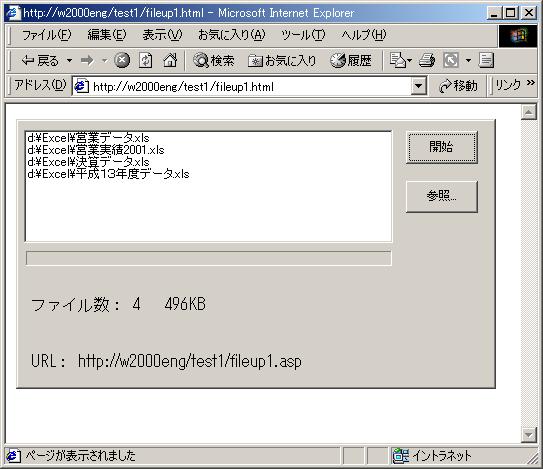
リストボックスに表示された複数ファイルを一度にアップロードします。
アップロードするファイルは、あらかじめパス名を指定しておきます。
また、リストボックス横の[参照]ボタンを押すと選択ダイアログからファイルを
追加できます。
次のようなHTMLテキストでファイルをアップロードするWebページを表示することができます。
 ----------------- fileup1.html -------------------------------------------
<HTML><BODY>
<OBJECT ID="BFUP" HEIGHT=270 WIDTH=480
CLASSID="CLSID:xxxxxxxx-xxxx-xxxx-xxxx-xxxxxxxxxxxx">
<PARAM NAME="Browse" VALUE="1">
<PARAM NAME="Exec" VALUE="UpLoad">
<PARAM NAME="FilePath" VALUE="d:\Excel">
<PARAM NAME="URL" VALUE="fileup1.asp">
</OBJECT>
</BODY></HTML>
----------------- fileup1.html -------------------------------------------
<HTML><BODY>
<OBJECT ID="BFUP" HEIGHT=270 WIDTH=480
 CLASSID="CLSID:xxxxxxxx-xxxx-xxxx-xxxx-xxxxxxxxxxxx">
    <PARAM NAME="Browse" VALUE="1">
    <PARAM NAME="Exec" VALUE="UpLoad">
    <PARAM NAME="FilePath" VALUE="d:\Excel">
    <PARAM NAME="URL" VALUE="fileup1.asp">
</OBJECT>
</BODY></HTML>
サーバサイド・スクリプトは、以下のようになります。
----------------- fileup1.asp -------------------------------------------
<%
a=Request.TotalBytes
b=Request.BinaryRead(a)
set bobj=Server.CreateObject("basp21pro")
' 全ファイルを保存
fcnt=bobj.FormSaveAs(b,"*","d:\temp\upload")
If fcnt < 1 Then ' エラーの場合は、200 番台以外のResponse.Status を返す
  Response.Buffer = True
  Response.Clear
  Response.Write "<HTML><BODY>506" & bobj.LastMsg & "</BODY></HTML>"
  Response.Status = "506 " & bobj.LastMsg
  Response.End
End If
%>
<HTML><HEAD><TITLE>File Upload</TITLE>
<BODY>
<H1>Testing</H1>
<BR>
fcnt= <%= fcnt %><BR>
</BODY></HTML>
スクリプトの書き方としてFormSaveAs メソッドの戻り値をチェックしてクライアントに
応答を返すようにしましょう。
■ フォルダ全体をZIP圧縮してアップロード(BASP21 Proと連携)
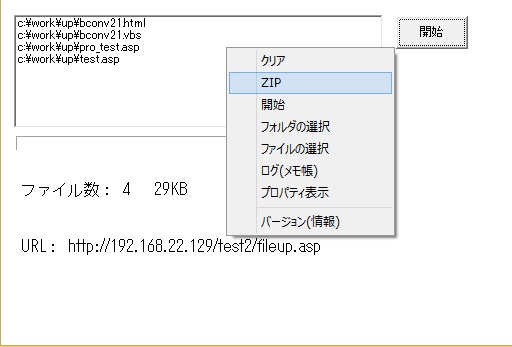
リストボックスに表示された複数ファイルをZIP圧縮してアップロードします。
Modifiedプロパティを使います。
zipパラメータは、バージョン 1,0,6712,6以降でサポートされます。
次のようなHTMLテキストでメニューからZIP圧縮してファイルをアップロードするWebページを表示することができます。
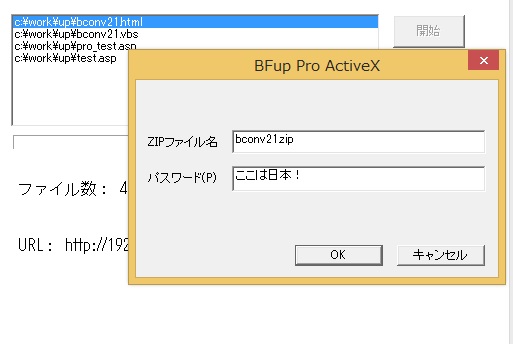
パスワードは、ダイアログで指定可能です。
----------------- fileupz1.html -------------------------------------------
<HTML><BODY>
<OBJECT ID="BFUP" HEIGHT=270 WIDTH=480
 CLASSID="CLSID:xxxxxxxx-xxxx-xxxx-xxxx-xxxxxxxxxxxx">
    <PARAM NAME="Exec" VALUE="UpLoad">
    <PARAM NAME="FilePath" VALUE="">
    <PARAM NAME="URL" VALUE="fileupz1.asp">
    <PARAM NAME="Modified" VALUE="#zip menu">
</OBJECT>
</BODY></HTML>
サーバサイド・スクリプトは、以下のようになります。
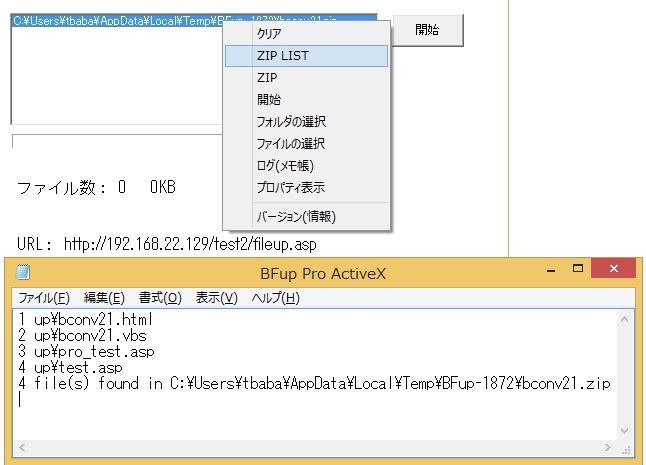
FormSaveAsメソッドで解凍処理を行います。
----------------- fileupz1.asp -------------------------------------------
<%@ Language="VBScript" %>
<% Option Explicit %>
<%
Dim bobj,a,b,rc,fpath,msg,mfile,fname
Set bobj = Server.CreateObject("basp21pro")
bobj.Env = "env1"
bobj.Env = "+logfile=c:\temp\test\uplog.txt"
a = Request.TotalBytes
b = Request.BinaryRead(a)
mfile = bobj.FormFileName(b,"xfile001")
fname = GetBaseName(mfile)
fpath = "c:\temp\test\" & fname ' ZIPファイル格納フォルダ
bobj.Env = "+zip=formsaveas" ' ZIP展開指定
bobj.Env = "+zipdir=c:\temp\test\zip" ' ZIP展開先フォルダ
bobj.Env = "+zippass=ここは日本!" ' ZIPパスワード
rc = bobj.FormSaveAs(b,"xfile001",fpath)
if rc > 0 Then
  msg ="OK " & rc
Else
  Response.Buffer = True
  Response.Clear
  Response.Write "<HTML><BODY>506" & bobj.LastMsg & "</BODY></HTML>"
  Response.Status = "506 " & bobj.LastMsg
  Response.End
End If
set bobj = Nothing
Function GetBaseName(name)
 Dim i
 i = Instrrev(name,"\")
 If i > 0 Then
   GetBaseName = Mid(name,i+1)
 Else
   GetBaseName = name
 End If
End Function
%>
<html><head>
<META http-equiv="Content-Type" content="text/html; charset=Shiftjis">
<title>File Upload(BASP21 Pro)</title></HEAD>
<body><%= Server.HTMLEncode(msg) %></body></html>
VBScriptバッチ処理サンプルは以下のようになります。
----------------- fileupz1.vbs -------------------------------------------
Set bfup = CreateObject("bfuppro")
url = "http://xxxx/xxx/fileupz1.asp"
filepath="d:\excel"
bfup.Modified="#zip auto;zippass ここは日本!"
rc = bfup.UpLoad(url,filepath)
Wscript.echo "done " & rc
■ ASP.NET環境でアップロード(HtmlInputFileクラス)
リストボックスに表示された複数ファイルを一度にアップロードします。
サーバサイドでは、ASP.NET環境でHtmlInputFileクラスを使います。HtmlInputFileクラスを使う場合には
BFup ProのCharsetプロパティでutf8を指定してください。
utf8を指定しないと日本語ファイル名がサーバサイドで正しく処理できません。
次のようなHTMLテキストでファイルをアップロードするWebページを表示することができます。
----------------- fileup1a.html -------------------------------------------
<HTML><BODY>
<OBJECT ID="BFUP" HEIGHT=270 WIDTH=480
 CLASSID="CLSID:xxxxxxxx-xxxx-xxxx-xxxx-xxxxxxxxxxxx">
    <PARAM NAME="Browse" VALUE="1">
    <PARAM NAME="Exec" VALUE="UpLoad">
    <PARAM NAME="FilePath" VALUE="d:\Excel">
    <PARAM NAME="URL" VALUE="fileup1.aspx">
    <PARAM NAME="Charset" VALUE="utf8">
    <PARAM NAME="Para" VALUE="パラメータ">
    <PARAM NAME="FireEvent" VALUE="1">
</OBJECT>
<script language=vbscript>
sub BFUP_onComplete(result)
  output.document.write result
end sub
sub BFUP_onLog(log)
  log = Replace(log,vbcrlf,"<BR>")
  output.document.write log & "<BR>"
  window.status = log ' IEのステータスバーにログ表示
end sub
sub BFUP_onstart
  output.document.open "text/html" ' フレームのクリア
end sub
</script>
<BR>
<IFRAME name=output WIDTH=600 HEIGHT=200>
</IFRAME>
</BODY></HTML>
ASP.NET環境でHtmlInputFileクラスを使ったサンプルは、以下のようになります。
----------------- fileup1.aspx ------------------------------------------
<%@ Page Language="C#" Codepage="932" %>
<html>
<script runat="server">
void Page_Load(object sender, EventArgs e)
{
   Server.ScriptTimeout = 3600;
   upload();
}
void upload()
{
   HtmlInputFile htmlfile = new HtmlInputFile();
   htmlfile.ID = "paranet";  // Paraプロパティの内容アクセス
   string para = "";
   if (htmlfile.PostedFile != null)
      para = getpara(htmlfile.PostedFile);
   list.InnerHtml = "para=" + para + "<BR>";
   int ctr = 0;
   for (int i = 1;;i++) {  // ファイル処理  xfile001 から順に処理
     htmlfile.ID = String.Format("xfile{0:d3}",i);
     if (htmlfile.PostedFile == null)
       break;
     ctr++;
     string fname = filesave(htmlfile.PostedFile); // ファイル保存処理
     list.InnerHtml = list.InnerHtml + fname + "<BR>";
   }
   list.InnerHtml = ctr.ToString() + " file(s) posted.<BR>" + list.InnerHtml;
}
string filesave(HttpPostedFile postfile)
{
   string fname = postfile.FileName;
   int i = fname.LastIndexOf("\\");
   string fpath = "c:\\temp" + fname.Substring(i);
   postfile.SaveAs(fpath);
   list.InnerHtml = list.InnerHtml + postfile.ContentLength.ToString() + "  ";
   return fpath;
}
string getpara(HttpPostedFile postfile)
{
   byte[] mydata = new byte[postfile.ContentLength];
   postfile.InputStream.Read(mydata,0,postfile.ContentLength);
   Encoding utf8 = Encoding.GetEncoding("UTF-8");
   return utf8.GetString(mydata);
}
   </script>
<body>
<div id="FileDetails" Visible=true runat="server">
   <span id="list" runat="server"/> <br>
 <br>
</div>
</body>
</html>
----------------- fileupvb1.aspx ------------------------------------------
<%@ Page Language="VB" Codepage="932" %>
<script runat="server">
Private Sub Page_Load(ByVal sender As System.Object, ByVal e As System.EventArgs)
   Server.ScriptTimeout = 3600
   call upload()
End Sub
Private Sub upload()
   Dim htmlfile as HtmlInputFile
   Dim para As String,fname As String, pagedata As String
   Dim i As Integer,ctr As Integer
   htmlfile = new HtmlInputFile()
   htmlfile.ID = "paranet"
   para = ""
   If Not (htmlfile.PostedFile Is Nothing) Then
      para = getpara(htmlfile.PostedFile)
   End If
   ctr = 0
   For i = 1 to 999    ' 複数ファイル処理  xfile001 から順に処理
     htmlfile.ID = "xfile" & Format(i,"000")
     If htmlfile.PostedFile Is Nothing Then Exit For
     ctr = ctr + 1
     fname = filesave(htmlfile.PostedFile) ' ファイル保存処理
     pagedata = pagedata & fname & "<BR>" & vbCrLf
   Next
   Response.ContentType = "html/text"
   Response.Write ("<HTML><BODY>")
   Response.Write (CStr(ctr) & " file(s) posted.<BR>")
   Response.Write ("para=" & para & "<BR>")
   Response.Write ("<B>" & pagedata & "</B>")
   Response.Write ("</BODY></HTML>")
End SUb

Private Function filesave(postfile As HttpPostedFile) As String
   Dim fname As String, fpath As String ,i As Integer
   fname = postfile.FileName
   i = InStrRev(fname,"\")
   fpath = "c:\temp" & Mid(fname,i)
   postfile.SaveAs(fpath)
   filesave = fpath
End Function
Private Function getpara(postfile As HttpPostedFile) As String
   Dim mydata() As Byte
   ReDim mydata(postfile.ContentLength-1)
   postfile.InputStream.Read(mydata,0,postfile.ContentLength)
   Dim utf8 As Encoding = System.Text.Encoding.GetEncoding("utf-8")
   getpara = utf8.GetString(mydata)
End Function
</script>
注意:
HtmlInputFileクラスを使う場合、デフォルトでは4MBまでのファイルしかアップロードできません。
この制限値を変更するにはmachine.configファイルのmaxRequestLength="4096"の値を修正します。
■ Struts環境でアップロード(Action/ActionFormクラス)
リストボックスに表示された複数ファイルを一度にアップロードします。
サーバサイドでは、Struts環境でAction/ActionFormクラスを使います。
BFup ProのCharsetプロパティでutf8を指定してください。
utf8を指定しないと日本語ファイル名がサーバサイドで正しく処理できません。
また、Modifiedプロパティにはupmode strutsを指定します。
upmode strutsを指定しないと、paranetという(Struts環境では不要な)パラメータがPOSTデータに
含まれてしまいます。
次のようなHTMLテキストでファイルをアップロードするWebページを表示することができます。
----------------- fileup1s.html -------------------------------------------
<HTML><BODY>
<OBJECT ID="BFUP" HEIGHT=270 WIDTH=480
 CLASSID="CLSID:xxxxxxxx-xxxx-xxxx-xxxx-xxxxxxxxxxxx">
    <PARAM NAME="Browse" VALUE="1">
    <PARAM NAME="Exec" VALUE="UpLoad">
    <PARAM NAME="FilePath" VALUE="d:\Excel">
    <PARAM NAME="URL" VALUE="Fileup1.do">
    <PARAM NAME="Charset" VALUE="utf8">
    <PARAM NAME="Para" VALUE="{param1='パラ1',param2='パラ2'}">
    <PARAM NAME="FireEvent" VALUE="1">
    <PARAM NAME="Modified" VALUE="#upmode struts">
</OBJECT>
<script language=vbscript>
sub BFUP_onComplete(result)
  output.document.write result
end sub
sub BFUP_onLog(log)
  log = Replace(log,vbcrlf,"<BR>")
  output.document.write log & "<BR>"
  window.status = log ' IEのステータスバーにログ表示
end sub
sub BFUP_onstart
  output.document.open "text/html" ' フレームのクリア
end sub
</script>
<BR>
<IFRAME name=output WIDTH=600 HEIGHT=200>
</IFRAME>
</BODY></HTML>
Struts環境でAction/ActionFormクラスを使ったサンプルは、以下のようになります。
----------------- struts-config.xml ------------------------------------------
<struts-config>
  <form-beans>
    <!-- 省略 -->
    <form-bean name="FileUp1ActionForm"
               type="jp.co.b21soft.sample.web.actionform.FileUp1ActionForm"/>
    <!-- 省略 -->
  </form-beans>

  <action-mapping>
    <!-- 省略 -->
    <action    path="Fileup1"
               type="jp.co.b21soft.sample.web.action.FileUp1Action"
               name="FileUpActionForm"
               input="FileUploadError.jsp"
               scope="request" />
<!-- 省略 -->
----------------- FileUp1ActionForm.java -------------------------------------
package jp.co.b21soft.sample.web.actionform;

import java.util.Enumeration;
import java.util.Hashtable;
import javax.servlet.http.HttpServletRequest;
import org.apache.struts.action.ActionForm;
import org.apache.struts.action.ActionMapping;
import org.apache.struts.upload.FormFile;

public class FileUp1ActionForm extends ActionForm
{
  public FileUp1ActionForm()
  {
  }
  public Hashtable getAllRequestTable()
  {
    return getMultipartRequestHandler().getAllElements() ;
  }

  public Hashtable getMultiFilesTable()
  {
    return getMultipartRequestHandler().getFileElements() ;
  }

  public Hashtable getMultiStringsTable()
  {
    return getMultipartRequestHandler().getTextElements() ;
  }

  public ActionErrors validate( ActionMapping mapping , HttpServletRequest request )
  {
  // 以下略
----------------- FileUp1Action.java -----------------------------------------
package jp.co.b21soft.sample.web.action;

import javax.servlet.ServletOutputStream;
import javax.servlet.http.HttpServletRequest;
import javax.servlet.http.HttpServletResponse;

import org.apache.struts.action.ActionForm;
import org.apache.struts.action.ActionForward;
import org.apache.struts.action.ActionMapping;
import org.apache.struts.upload.FormFile;

import jp.co.b21soft.web.actionform.FileUp1ActionForm;

public class FileUp1Action extends Action
{
  public FileUp1Action()
  {
  }

  protected ActionForward executen( ActionMapping mapping , ActionForm form ,
      HttpServletRequest request , HttpServletResponse response )
  {
    // 省略

    FileUp1ActionForm multiForm = (FileUp1ActionForm) form ;
    Hashtable multiFilesTable = multiForm.getMultiFilesTable() ;
    Hashtable multiStringsTable = multiForm.getMultiStringsTable() ;

    // 自前でアップロードされたファイルを保存
    saveMultiFiles( multiFilesTable ) ;

   // Paraプロパティで設定したパラメータは以下のように取得
   String param1 = ( (String[])multiStringsTable.get( "param1" ) )[ 0 ];
   String param2 = ( (String[])multiStringsTable.get( "param2" ) )[ 0 ];

  // 以下略
  }

  private void saveMultiFiles( Hashtable filesTable )
  {
    // 保存先指定
    String saveDirPath = "保存先" ;
    File saveDir = new File( saveDirPath ) ;

    for( Iterator it = filesTable.keySet().iterator() ; it.hasNext() ; )
    {
      String fileParam = (String) it.next() ;
      FormFile formFile = (FormFile) filesTable.get( fileParam ) ;

      // 省略

      String fileName = formFile.getFileName() ;

      File saveFilePath = new File( saveDir , fileName ) ;

      BufferedInputStream bis = null ;
      BufferedOutputStream bos = null ;
      try
      {
        bis = new BufferedInputStream( formFile.getInputStream() , 60000 ) ;
        bos = new BufferedOutputStream( new FileOutputStream( saveFilePath ) , 60000 ) ;

        int b = 0 ;
        while( ( b = bis.read() ) != -1 )
          bos.write( b ) ;
      }
      catch( IOException ie )
      {
        // エラー処理(省略)
      }
      finally
      {
        try
        {
          bis.close() ;
          bos.flush() ;
          bos.close() ;
        }
        catch( IOException ie )
        {
          // エラー処理(省略)
        }
      }
    }
    // 以下略
■ Javaサーブレット環境でアップロード
リストボックスに表示された複数ファイルを一度にアップロードします。
サーバサイドでは、サーブレット(UploadFileServlet.java)を使います。
次のようなHTMLテキストでファイルをアップロードするWebページを表示することができます。
----------------- fileup1s.html -------------------------------------------
<HTML><BODY>
<OBJECT ID="BFUP" HEIGHT=270 WIDTH=480
 CLASSID="CLSID:xxxxxxxx-xxxx-xxxx-xxxx-xxxxxxxxxxxx">
    <PARAM NAME="Exec" VALUE="UpLoad">
    <PARAM NAME="FilePath" VALUE="d:\Excel">
    <PARAM NAME="URL" VALUE="UploadFileServlet">
</OBJECT>
サーブレットのサンプルは、以下のようになります。
----------------- UploadFileServlet.java ------------------------------------------
package bfup;
import java.io.*;
import java.util.*;
import javax.servlet.*;
import javax.servlet.http.*;
import org.apache.commons.fileupload.*;
import org.apache.commons.fileupload.disk.*;
import org.apache.commons.fileupload.servlet.*;

// 以下のjar ファイルが必要です
// commons-fileupload-1.2.jar
// commons-io-1.3.2.jar
// servlet-api.jar

public class UploadFileServlet extends HttpServlet {
  public void doPost(HttpServletRequest req,
                     HttpServletResponse res)
                     throws ServletException, IOException {

    //(1)アップロードファイルを格納するPATHを取得
    String path = getServletContext().getRealPath("savefiles");

    //(2)ServletFileUploadオブジェクトを生成
    DiskFileItemFactory factory = new DiskFileItemFactory();
    ServletFileUpload upload = new ServletFileUpload(factory);

    //(3)アップロードする際の基準値を設定
    factory.setSizeThreshold(1024);
    upload.setSizeMax(-1);
    upload.setHeaderEncoding("Windows-31J");

    try {
      //(4)ファイルデータ(FileItemオブジェクト)を取得し、
      //   Listオブジェクトとして返す
      List list = upload.parseRequest(req);

      //(5)ファイルデータ(FileItemオブジェクト)を順に処理
      Iterator iterator = list.iterator();
      while(iterator.hasNext()){
        FileItem fItem = (FileItem)iterator.next();

        //(6)ファイルデータの場合、if内を実行
        if(!(fItem.isFormField())){
          //(7)ファイルデータのファイル名(PATH名含む)を取得
          String fileName = fItem.getName();
          if((fileName != null) && (!fileName.equals(""))){
            //(8)PATH名を除くファイル名のみを取得
            fileName=(new File(fileName)).getName();
            //(9)ファイルデータを指定されたファイルに書き出し
            fItem.write(new File(path + "/" + fileName));
          }
        }
      }
    }catch (FileUploadException e) {
      e.printStackTrace();
    }catch (Exception e) {
      e.printStackTrace();
    }
    //(10)HTML出力
    res.setContentType("text/html; charset=Shift_JIS");
    PrintWriter out = res.getWriter();
    out.println("<html>");
    out.println("<head>");
    out.println("<title>Upload File Servlet</title>");
    out.println("</head>");
    out.println("<body>");
    out.println("Done!");
    out.println("</body>");
    out.println("</html>");
  }
}
■ 大きいファイルを分割アップロード
SplitSizeプロパティを使うと、サーバーの負担なしに
大きいサイズのファイルをアップロードできます。
サーバーサイドでは、FormSaveAsメソッドの追加モードでファイルを保存します。
分割オプションを使う場合は、2GB以上のファイルをアップロードできます。
SplitSizeプロパティにはKB単位の分割サイズを指定します。
URLで指定したサーバーサイド・スクリプトが分割サイズに応じて、複数回呼出され実行されます。
最適な分割サイズは、IIS環境によって異なります。
以下の例は、1024KB単位でファイルをアップロードするサンプルです。
----------------- bigfileup1.html -------------------------------------------
<HTML><BODY>
<OBJECT ID="BFUP" HEIGHT=270 WIDTH=480
 CLASSID="CLSID:xxxxxxxx-xxxx-xxxx-xxxx-xxxxxxxxxxxx">
    <PARAM NAME="Browse" VALUE="1">
    <PARAM NAME="Exec" VALUE="UpLoad">
    <PARAM NAME="FilePath" VALUE="d:\Excel\100MB">
    <PARAM NAME="SplitSize" VALUE="1024">
    <PARAM NAME="URL" VALUE="bigfile1.asp">
</OBJECT>
</BODY></HTML>
分割オプションを使った場合は、サーバサイドの
FileSaveAsメソッドの
第4パラメータの追加モードを指定してファイルを保存する必要があります。
以下の例は、FormSaveAsメソッドを使うVBScriptサンプルです。
----------------- bigfileup1.asp -------------------------------------------
<%
Response.Buffer = True
Response.Clear
Server.ScriptTimeout = 3600
a=Request.TotalBytes
b=Request.BinaryRead(a)
Set bobj=Server.CreateObject("basp21pro")
splitinfo=bobj.Form(b,"split")
name=bobj.FormFileName(b,"xfile001")
name=Mid(name,InstrRev(name,"\")+1)
If Mid(splitinfo,1,2) = "1/" Then  ' 最初のデータ
  mode = 0
Else
  mode = 2  ' 追加モード
End If
fsize=bobj.FormSaveAs(b,"xfile001","d:\temp\upload\big\" & name,mode)
If fsize <= 0 Then   ' エラーの場合は、UpLoadメソッドを中断させるために
                        '  200 番台以外のResponse.Status を返してください
  Response.Write "<HTML><BODY>506" & bobj.LastMsg & "</BODY></HTML>"
  Response.Status = "506 " & bobj.LastMsg
  Response.End
End If
%>
<HTML><HEAD><TITLE>Large File Upload</TITLE>
<BODY>
splitinfo= <%= splitinfo %><BR>
fsize= <%= fsize %><BR>
fname= <%= fname %><BR>
</BODY></HTML>
■ ASP.NET環境で大きいファイルを分割アップロード(HtmlInputFileクラス)
SplitSizeプロパティを使うと、サーバーの負担なしに
大きいサイズのファイルをアップロードできます。
サーバサイドでは、ASP.NET環境でHtmlInputFileクラスを使います。HtmlInputFileクラスを使う場合には
BFup ProのCharsetプロパティでutf8を指定してください。
utf8を指定しないと日本語ファイル名がサーバサイドで正しく処理できません。
分割オプションを使う場合は、2GB以上のファイルをアップロードできます。
SplitSizeプロパティにはKB単位の分割サイズを指定します。
URLで指定したサーバーサイド・スクリプトが分割サイズに応じて、複数回呼出され実行されます。
最適な分割サイズは、IIS環境によって異なります。
以下の例は、1024KB単位でファイルをアップロードするサンプルです。
----------------- bigfileup2.html -------------------------------------------
<HTML><BODY>
<OBJECT ID="BFUP" HEIGHT=270 WIDTH=480
 CLASSID="CLSID:xxxxxxxx-xxxx-xxxx-xxxx-xxxxxxxxxxxx">
    <PARAM NAME="Browse" VALUE="1">
    <PARAM NAME="Exec" VALUE="UpLoad">
    <PARAM NAME="FilePath" VALUE="d:\Excel\100MB">
    <PARAM NAME="SplitSize" VALUE="1024">
    <PARAM NAME="URL" VALUE="bigfile2.aspx">
    <PARAM NAME="Charset" VALUE="utf8">
</OBJECT>
</BODY></HTML>
----------------- bigfileup2.aspx -------------------------------------------
<%@ Page Language="C#" Codepage="932" %>
<html>
<script runat="server">
void Page_Load(object sender, EventArgs e)
{
   Server.ScriptTimeout = 3600;
   upload();
}
void upload()
{
   HtmlInputFile htmlfile = new HtmlInputFile();
   htmlfile.ID = "splitnet";  // 分割パラメータの内容アクセス
   string splitinfo = "";
   if (htmlfile.PostedFile == null)
     return;
   splitinfo = getpara(htmlfile.PostedFile);
   list.InnerHtml = "splitinfo=" + splitinfo + "<BR>";
   int mode = 0;    // 先頭データ
   if (splitinfo.Substring(0,2) != "1/")
      mode = 2;  // 追加モード
   htmlfile.ID = "xfile001";
   if (htmlfile.PostedFile == null)
       return;
   string fname = filesave(htmlfile.PostedFile,mode); // ファイル保存処理
   list.InnerHtml = list.InnerHtml + fname + "<BR>";
}
string filesave(HttpPostedFile postfile,int filemode)
{
   string fname = postfile.FileName;
   int i = fname.LastIndexOf("\\");
   string fpath = "c:\\temp" + fname.Substring(i);
   int dlen = postfile.ContentLength;
   byte[] filedata = new byte[dlen];
   postfile.InputStream.Read(filedata,0,dlen);
   System.IO.FileInfo fileInfo = new System.IO.FileInfo(fpath);
   System.IO.FileStream fs;
   if (filemode == 0)
      fs = fileInfo.Open(System.IO.FileMode.Create);
   else
      fs = fileInfo.Open(System.IO.FileMode.Append,System.IO.FileAccess.Write);
   fs.Write(filedata, 0, dlen);
   fs.Close();
   list.InnerHtml = list.InnerHtml + dlen.ToString() + "  ";
   return fpath;
}
string getpara(HttpPostedFile postfile)
{
   byte[] mydata = new byte[postfile.ContentLength];
   postfile.InputStream.Read(mydata,0,postfile.ContentLength);
   ASCIIEncoding ascii = new ASCIIEncoding();
   return ascii.GetString(mydata);
}
   </script>
<body>
<div id="FileDetails" Visible=true runat="server">
   <span id="list" runat="server"/> <br>
 <br>
</div>
</body>
</html>
----------------- bigfileupvb2.aspx ------------------------------------------
<%@ Page Language="VB" Codepage="932" %>
<script runat="server">
Private Sub Page_Load(ByVal sender As System.Object, ByVal e As System.EventArgs)
   Server.ScriptTimeout = 3600
   call upload()
End Sub
Private Sub upload()
   Dim htmlfile As HtmlInputFile = new HtmlInputFile()
   htmlfile.ID = "splitnet"  ' 分割パラメータの内容アクセス
   Dim splitinfo As String,mode As Integer, fname As String
   splitinfo = ""
   If (htmlfile.PostedFile Is Nothing) Then Exit Sub
   splitinfo = getpara(htmlfile.PostedFile)
   list.InnerHtml = "splitinfo=" & splitinfo & "<BR>"
   mode = 0    ' 先頭データ
   If (Mid(splitinfo,1,2) <> "1/") Then mode = 2  ' 追加モード
   htmlfile.ID = "xfile001"
   If (htmlfile.PostedFile Is Nothing) Then Exit Sub
   fname = filesave(htmlfile.PostedFile,mode)  ' ファイル保存処理
   list.InnerHtml = list.InnerHtml & fname & "<BR>"
End Sub
Private Function filesave(postfile As HttpPostedFile, filemode As Integer) As String
   Dim fname As String, i As Integer, fpath As String
   Dim dlen As Integer
   Dim filedata() As Byte
   Dim fileInfo As System.IO.FileInfo
   Dim fs As System.IO.FileStream
   fname = postfile.FileName
   i = InStrRev(fname,"\")
   fpath = "c:\temp" & Mid(fname,i)
   dlen = postfile.ContentLength
   ReDim filedata(dlen-1)
   postfile.InputStream.Read(filedata,0,dlen)
   fileInfo = new System.IO.FileInfo(fpath)
   If (filemode = 0) Then
      fs = fileInfo.Open(System.IO.FileMode.Create)
   Else
      fs = fileInfo.Open(System.IO.FileMode.Append,System.IO.FileAccess.Write)
   End If
   fs.Write(filedata, 0, dlen)
   fs.Close()
   list.InnerHtml = list.InnerHtml & CStr(dlen) & "  "
   filesave = fpath
End Function
Private Function getpara(postfile As HttpPostedFile) As String
   Dim mydata() As Byte
   ReDim mydata(postfile.ContentLength-1)
   postfile.InputStream.Read(mydata,0,postfile.ContentLength)
   Dim ascii As ASCIIEncoding = new ASCIIEncoding()
   getpara = ascii.GetString(mydata)
End Function
</script>
<body>
<div id="FileDetails" Visible=true runat="server">
   <span id="list" runat="server"/> <br>
 <br>
</div>
</body>
</html>
■ ボタンでファイルを選択してアップロード
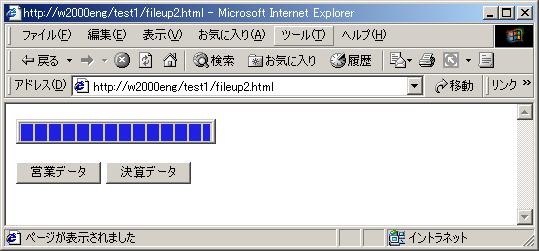
ボタンでアップロードするファイルを選択するサンプルです。
プログレスバーのみ表示するサンプルです。
 ----------------- fileup2.html -------------------------------------------
<HTML><BODY>
<OBJECT ID="BFUP" HEIGHT=25 WIDTH=200
CLASSID="CLSID:xxxxxxxx-xxxx-xxxx-xxxx-xxxxxxxxxxxx">
<PARAM NAME="BarColor" VALUE="#2020E0">
<PARAM NAME="BarHeight" VALUE="22">
<PARAM NAME="BarWidth" VALUE="194">
<PARAM NAME="Hidden" VALUE="23">
</OBJECT>
<SCRIPT LANGUAGE="VBScript">
Sub File1_onClick()
BFUP.CLear()
filepath = "d:\excel\営業データ.xls"
url = "fileup1.asp"
rc = BFUP.UpLoad(url,filepath)
End Sub
Sub File2_onClick()
BFUP.CLear()
filepath = "d:\excel\決算データ.xls"
url = "fileup1.asp"
rc = BFUP.UpLoad(url,filepath)
End Sub
</SCRIPT>
<BR><BR>
<input type=button name=File1 value="営業データ">
<input type=button name=File2 value="決算データ">
</BODY></HTML>
----------------- fileup2.html -------------------------------------------
<HTML><BODY>
<OBJECT ID="BFUP" HEIGHT=25 WIDTH=200
 CLASSID="CLSID:xxxxxxxx-xxxx-xxxx-xxxx-xxxxxxxxxxxx">
    <PARAM NAME="BarColor" VALUE="#2020E0">
    <PARAM NAME="BarHeight" VALUE="22">
    <PARAM NAME="BarWidth" VALUE="194">
    <PARAM NAME="Hidden" VALUE="23">
</OBJECT>
<SCRIPT LANGUAGE="VBScript">
Sub File1_onClick()
  BFUP.CLear()
  filepath = "d:\excel\営業データ.xls"
  url = "fileup1.asp"
  rc = BFUP.UpLoad(url,filepath)
End Sub
Sub File2_onClick()
  BFUP.CLear()
  filepath = "d:\excel\決算データ.xls"
  url = "fileup1.asp"
  rc = BFUP.UpLoad(url,filepath)
End Sub
</SCRIPT>
<BR><BR>
<input type=button name=File1 value="営業データ">
<input type=button name=File2 value="決算データ">
</BODY></HTML>
JScript のサンプルは、以下のとおりです。
----------------- fileup2j.html -------------------------------------------
<HTML><BODY>
<OBJECT ID="BFUP" HEIGHT=25 WIDTH=200
 CLASSID="CLSID:xxxxxxxx-xxxx-xxxx-xxxx-xxxxxxxxxxxx">
    <PARAM NAME="BarColor" VALUE="#2020E0">
    <PARAM NAME="BarHeight" VALUE="22">
    <PARAM NAME="BarWidth" VALUE="194">
    <PARAM NAME="Hidden" VALUE="23">
</OBJECT>
<script language="JavaScript">
function File1_onClick(){
  BFUP.Clear();
  var filepath = "d:\\excel\\営業データ.xls";
  var url = "fileup1.asp";
  var rc = BFUP.UpLoad(url,filepath);
}
function File2_onClick(){
  BFUP.Clear();
  var filepath = "d:\\excel\\決算データ.xls";
  var url = "fileup1.asp";
  var rc = BFUP.UpLoad(url,filepath);
}
</SCRIPT>
<BR><BR>
<input type=button name=File1 value="営業データ"
 OnClick="File1_onClick()">
<input type=button name=File2 value="決算データ"
 OnClick="File2_onClick()">
</BODY></HTML>
■ 本日修正したファイルのみアップロード
Modifiedプロパティを使うと修正日によって
ファイルを選択してアップロードします。
次のようなHTMLテキストで本日修正したファイルのみをアップロードする
Webページを表示することができます。
----------------- fileup2s.html -------------------------------------------
<HTML><BODY>
<OBJECT ID="BFUP" HEIGHT=270 WIDTH=480
 CLASSID="CLSID:xxxxxxxx-xxxx-xxxx-xxxx-xxxxxxxxxxxx">
    <PARAM NAME="Browse" VALUE="1">
    <PARAM NAME="Exec" VALUE="UpLoad">
    <PARAM NAME="FilePath" VALUE="d:\Excel">
    <PARAM NAME="Modified" VALUE="today">
    <PARAM NAME="URL" VALUE="fileup1.asp">
</OBJECT>
</BODY></HTML>
■ ファイルを圧縮してアップロード
Gzipプロパティを使うとファイルを圧縮してアップロードできます。
一旦、すべてのファイルを個別にgzipファイル(拡張子 ".gz")に圧縮してからアップロードします。
オリジナルのファイルは、そのままです。アップロード後に作成されたgzipファイルは、削除されます。
次のようなHTMLテキストで、圧縮したファイルをアップロードする
Webページを表示することができます。
----------------- fileup2gs.html -------------------------------------------
<HTML><BODY>
<OBJECT ID="BFUP" HEIGHT=270 WIDTH=480
 CLASSID="CLSID:xxxxxxxx-xxxx-xxxx-xxxx-xxxxxxxxxxxx">
    <PARAM NAME="Browse" VALUE="1">
    <PARAM NAME="Exec" VALUE="UpLoad">
    <PARAM NAME="FilePath" VALUE="d:\Excel">
    <PARAM NAME="Gzip" VALUE="1">
    <PARAM NAME="URL" VALUE="fileup1.asp">
</OBJECT>
</BODY></HTML>
■ FTPサーバーにアップロード
クライアントからFTPサーバーにファイルをアップロードするには
アップロードURLを"ftp://"で指定するとFTPモードでファイルのアップロードができます。
以下に、ページ表示時に自動的にFTPサーバーにファイルをアップロードするサンプルを示します。
----------------- fileup3f.html -------------------------------------------
<HTML><BODY>
<OBJECT ID="BFUP" HEIGHT=25 WIDTH=300
 CLASSID="CLSID:xxxxxxxx-xxxx-xxxx-xxxx-xxxxxxxxxxxx">
    <PARAM NAME="AutoStart" VALUE="1">
    <PARAM NAME="BarColor" VALUE="#2020E0">
    <PARAM NAME="BarHeight" VALUE="22">
    <PARAM NAME="BarWidth" VALUE="294">
    <PARAM NAME="Charset" VALUE="euc">
    <PARAM NAME="Exec" VALUE="UpLoad">
    <PARAM NAME="FilePath" VALUE="d:\Excel">
    <PARAM NAME="Hidden" VALUE="23">
    <PARAM NAME="URL" VALUE="ftp://user1:pass1@ftp-server/wk">
</OBJECT>
</BODY></HTML>
FTPアカウント名とパスワードは、"ftp://xxxx:yyyy@server" のように
URLのサーバ名の前に "@" で区切って指定します。
あるいは
Authパラメータでも指定可能です。
サーバ側のフォルダは、サーバ名の後に"/"で区切って指定します。
Charsetプロパティを使うとファイル名を
エンコードできます。Linux などに日本語ファイル名をEUCエンコードして送信するときに
便利です。
■ FTPサーバーにFTPS(FTP over SSL)でアップロード
クライアントからFTPサーバーにFTPS(FTP over SSL)通信でファイルをアップロードするには
アップロードURLを"ftps://"で指定します。
以下に、FTPサーバーにファイルをアップロードするサンプルを示します。
----------------- fileup3fs.html -------------------------------------------
<HTML><BODY>
<OBJECT ID="BFUP" HEIGHT=25 WIDTH=300
 CLASSID="CLSID:xxxxxxxx-xxxx-xxxx-xxxx-xxxxxxxxxxxx">
    <PARAM NAME="AutoStart" VALUE="1">
    <PARAM NAME="BarColor" VALUE="#2020E0">
    <PARAM NAME="BarHeight" VALUE="22">
    <PARAM NAME="BarWidth" VALUE="294">
    <PARAM NAME="Exec" VALUE="UpLoad">
    <PARAM NAME="FilePath" VALUE="d:\Excel">
    <PARAM NAME="Hidden" VALUE="23">
    <PARAM NAME="URL" VALUE="ftps://user1:pass1@ftp-server/wk">
</OBJECT>
</BODY></HTML>
FTPアカウント名とパスワードは、"ftps://xxxx:yyyy@server" のように
URLのサーバ名の前に "@" で区切って指定します。
あるいは
Authパラメータでも指定可能です。
サーバ側のフォルダは、サーバ名の後に"/"で区切って指定します。
注意:
FTPS(FTP over SSL)通信を実行する場合は、ftpサーバソフトがFTPS(FTP over SSL)を
サポートしている必要があります。また、プロクシを使ったFTPS(FTP over SSL)は
サポートしません。
■ FTPサーバーに圧縮アップロード
クライアントからFTPサーバーにファイルを圧縮してアップロードするには
Gzipプロパティを使います。
----------------- fileup3fg.html -------------------------------------------
<HTML><BODY>
<OBJECT ID="BFUP" HEIGHT=25 WIDTH=300
 CLASSID="CLSID:xxxxxxxx-xxxx-xxxx-xxxx-xxxxxxxxxxxx">
    <PARAM NAME="AutoStart" VALUE="1">
    <PARAM NAME="BarColor" VALUE="#2020E0">
    <PARAM NAME="BarHeight" VALUE="22">
    <PARAM NAME="BarWidth" VALUE="294">
    <PARAM NAME="Exec" VALUE="UpLoad">
    <PARAM NAME="FilePath" VALUE="d:\Excel">
    <PARAM NAME="Hidden" VALUE="23">
    <PARAM NAME="Gzip" VALUE="1">
    <PARAM NAME="URL" VALUE="ftp://user1:pass1@ftp-server/wk">
</OBJECT>
</BODY></HTML>
■ SJISからEUCに変換してFTPサーバーにアップロード
クライアントからFTPサーバーにSJISからEUCに変換してファイルをアップロードするには
Encodeプロパティを使います。
----------------- fileup4f.html -------------------------------------------
<HTML><BODY>
<OBJECT ID="BFUP" HEIGHT=25 WIDTH=300
 CLASSID="CLSID:xxxxxxxx-xxxx-xxxx-xxxx-xxxxxxxxxxxx">
    <PARAM NAME="AutoStart" VALUE="1">
    <PARAM NAME="BarColor" VALUE="#2020E0">
    <PARAM NAME="BarHeight" VALUE="22">
    <PARAM NAME="BarWidth" VALUE="294">
    <PARAM NAME="Encode" VALUE="sjis-euc">
    <PARAM NAME="Exec" VALUE="UpLoad">
    <PARAM NAME="FilePath" VALUE="d:\html">
    <PARAM NAME="Hidden" VALUE="23">
    <PARAM NAME="URL" VALUE="ftp://user1:pass1@ftp-server/wk">
</OBJECT>
</BODY></HTML>
■ PHPサーバーサイド・スクリプト
サーバ側でアップロードされるファイルを処理するPHPスクリプトの作成方法を説明します。
BFup Pro ActiveXコントロールで指定したアップロードURLの
スクリプトの拡張子が"php" または"php3"の場合は、サーバサイドのスクリプトをPHP
とみなし、ファイルのフィールド名を"xfiles[]"(注:小文字)として送信します。
PHPでは変数名後の"[]" は、配列として解釈します。
ファイルのフィールド名を配列にしたくない場合は、スクリプトの拡張子をphp4に
設定してください。フィールド名は、"xfilennn" (nnnは001からの連番)となります。
apache で拡張子php4がタイプ定義されていない場合、httpd.conf に以下のように
php4 の行を追加してください。
AddType application/x-httpd-php .php4
PHPのRFC1867実装は、アップロードに成功するとフィールドのタグ名がそのまま変数名となり
PHPスクリプト内からアクセスできる仕様になっています。
| PHP変数名 | 説明 |
| $xfiles[n] |
アップロードされて作成された一時的なファイル名
|
| $xfiles_name[n] |
オリジナルのファイル名
|
| $xfiles_size[n] |
ファイルのサイズ
|
| $xfiles_type[n] |
ファイルのMIMEタイプ。application/octet-stream固定です
|
注意:PHPは、関数名(echo/Echoなど)の大文字小文字は区別しませんが、
変数名の大文字小文字は区別します。$XFILES[0]や$xfiles_NAME[$i]などでは
アクセスに失敗します。
PHPではスクリプト実行時にアップロードする個々のすべてのファイルを一時的に
PHPが内部的に作成する仕様になっています。
このファイルは、スクリプト終了時にPHPによって自動的に削除されますので、
保存するためには別のファイルにコピーする必要があります。
PHPアップロードでは"[]"を使うフィールド名は、配列(添字は0から)として扱うことができます。
変数$xfiles[0]がアップロードされた最初の一時ファイル名、
変数$xfiles[1]が2番目の一時ファイル名です。
次に UpLoadメソッドに対応するサーバー・サイドのPHPスクリプトサンプルを示します。
----------------- fileup1.php -------------------------------------------
<?php
  $head = "<HTML><HEAD><TITLE>File Upload using PHP</TITLE></HEAD><BODY>\r\n";
  if (!isset($xfiles[0])) {
    $body = "
<OBJECT ID=\"BFUP\" HEIGHT=25 WIDTH=300
 CLASSID=\"CLSID:xxxxxxxx-xxxx-xxxx-xxxx-xxxxxxxxxxxx\">
    <PARAM NAME=\"BarColor\" VALUE=\"#2020E0\">
    <PARAM NAME=\"BarHeight\" VALUE=\"22\">
    <PARAM NAME=\"BarWidth\" VALUE=\"294\">
    <PARAM NAME=\"Exec\" VALUE=\"UpLoad\">
    <PARAM NAME=\"Charset\" VALUE=\"euc\">
    <PARAM NAME=\"FilePath\" VALUE=\"d:\\Excel\">
    <PARAM NAME=\"Hidden\" VALUE=\"23\">
    <PARAM NAME=\"URL\" VALUE=\"fileup1.php\">
</OBJECT>";
    echo $head;
    echo $body;
  } else {
    $path = '/tmp/upload/';
    $max = 999;
    $data =  "<table border=1>";
    $data .=  "<tr><td>#</td><td>xfile</td><td>size</td></tr>\r\n";
    for ($i = 0;$i < $max;$i++) {
      if ($xfiles[$i] == '')
        break;
      $j = $i+1;
      $data .=  "<tr><td>$j</td><td>$xfiles[$i]</td>";
      $data .=  "<td>$xfiles_size[$i]</td></tr>\r\n";
      if (!copy($xfiles[$i],$path.$xfiles_name[$i]))
        $err .=  "failed to copy $xfiles[$i]";
    }
    $data .=  "</table>";
    if (!isset($err)) {
      echo $head;
      echo $data;
    } else {
      header("HTTP/1.0 506 error " . $err);
      exit;
    }
  }
?>
</BODY></HTML>
SplitSizeプロパティを使った分割アップロードを処理するPHPスクリプトを
以下に示します。
----------------- fileup2.php -------------------------------------------
<?php
  $head = "<HTML><HEAD><TITLE>File Upload using PHP</TITLE></HEAD><BODY>\r\n";
  if (!isset($xfiles[0])) {
    $body = "
<OBJECT ID=\"BFUP\" HEIGHT=25 WIDTH=300
 CLASSID=\"CLSID:xxxxxxxx-xxxx-xxxx-xxxx-xxxxxxxxxxxx\">
    <PARAM NAME=\"BarColor\" VALUE=\"#2020E0\">
    <PARAM NAME=\"BarHeight\" VALUE=\"22\">
    <PARAM NAME=\"BarWidth\" VALUE=\"294\">
    <PARAM NAME=\"Exec\" VALUE=\"UpLoad\">
    <PARAM NAME=\"Charset\" VALUE=\"euc\">
    <PARAM NAME=\"FilePath\" VALUE=\"d:\\Excel\\100MB\">
    <PARAM NAME=\"Hidden\" VALUE=\"23\">
    <PARAM NAME=\"SplitSize\" VALUE=\"1024\">
    <PARAM NAME=\"URL\" VALUE=\"fileup2.php\">
</OBJECT>";
    echo $head;
    echo $body;
  } else {
    $path = '/tmp/upload/';
    if (substr($split,0,2) == "1/") {
      if (!copy($xfiles[0],$path.$xfiles_name[0]))
        $err .=  "failed to copy $xfiles[0]";
    } else {
      system("cat " . $xfiles[0] . ">> " . $path.$xfiles_name[0]);
    }
    if (!isset($err)) {
      echo $head;
      echo $data;
    } else {
      header("HTTP/1.0 506 error " . $err);
      exit;
    }
  }
?>
</BODY></HTML>
PHP-4.2.0からデフォルトでregister_globals=Off となりますので
$xfiles 変数がグローバル変数とならずにアップロードが失敗する場合は、
php.iniファイルでregister_globals=Onと設定するか
以下のように $_FILES 変数を使用してください。
----------------- fileup1a.php -------------------------------------------
<?php
  $head = "<HTML><HEAD><TITLE>File Upload using PHP</TITLE></HEAD><BODY>\r\n";
  // phpinfo(32);  変数をスナップ
  if (!isset($_FILES['xfiles']['name'][0])) {
    $body = "
<OBJECT ID=\"BFUP\"
 CLASSID=\"CLSID:xxxxxxxx-xxxx-xxxx-xxxx-xxxxxxxxxxxx\">
    <PARAM NAME=\"Exec\" VALUE=\"UpLoad\">
    <PARAM NAME=\"Charset\" VALUE=\"euc\">
    <PARAM NAME=\"URL\" VALUE=\"fileup1a.php\">
</OBJECT>";
    echo $head;
    echo $body;
  } else {
    $path = '/tmp/upload/';
    $max = 999;
    $data =  "<table border=1>";
    $data .=  "<tr><td>#</td><td>xfile</td><td>size</td></tr>\r\n";
    for ($i = 0;$i < $max;$i++) {
      if ($_FILES['xfiles']['name'][$i] == '')
        break;
      $j = $i+1;
      $data .=  "<tr><td>$j</td><td>{$_FILES['xfiles']['name'][$i]}</td>";
      $data .=  "<td>{$_FILES['xfiles']['size'][$i]}</td></tr>\r\n";
      if (!copy($_FILES['xfiles']['tmp_name'][$i],$path.$_FILES['xfiles']['name'][$i]))
        $err .=  "failed to copy {$_FILES['xfiles']['tmp_name'][$i]}";
    }
    $data .=  "</table>";
    if (!isset($err)) {
      echo $head;
      echo $data;
    } else {
      header("HTTP/1.0 506 error " . $err);
      exit;
    }
  }
?>
</BODY></HTML>
■ デバッグ方法
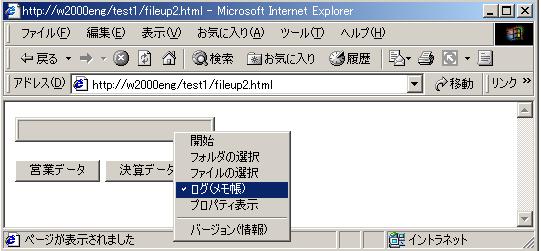
どうもうまく動かない場合は、以下のように右クリックしてコンテキストメニューから[ログ(メモ帳)]に
チェックを入れて実行すると、処理状況が詳細にログ情報がメモ帳に出力されますので動作確認に便利です。
メモ帳は、自動的に起動されます。
ログの出力指示は、
Logプロパティでも可能です。
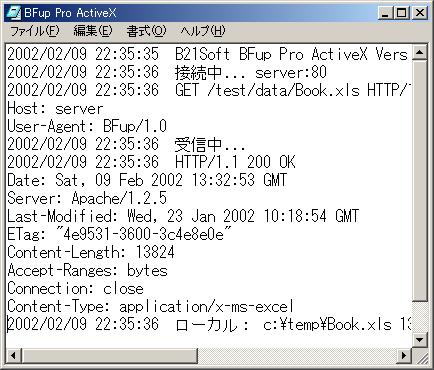
ログ情報は、次のように出力されます。
■ ファイルダウンロード(ASP)
ファイルダウンロードは、クライアントにサーバ側のファイルを格納する処理です。
ここでは次のトピックを説明します。
■ EUCコードをSJISにエンコードしてダウンロード
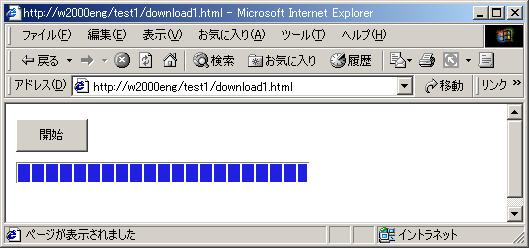
SJISにエンコードしてダウンロードするサンプルを以下に示します。
Hiddenパラメータを使って開始ボタンとプログレスバーのみ表示します。
 ----------------- download1.html -------------------------------------------
<HTML><BODY>
<OBJECT ID="BFUP" HEIGHT=100 WIDTH=300
CLASSID="CLSID:xxxxxxxx-xxxx-xxxx-xxxx-xxxxxxxxxxxx">
<PARAM NAME="BarColor" VALUE="#2020E0">
<PARAM NAME="BarHeight" VALUE="22">
<PARAM NAME="BarWidth" VALUE="294">
<PARAM NAME="Encode" VALUE="euc-sjis">
<PARAM NAME="Exec" VALUE="DownLoad">
<PARAM NAME="FilePath" VALUE="c:\temp">
<PARAM NAME="Hidden" VALUE="22">
<PARAM NAME="TransParent" VALUE="1">
<PARAM NAME="URL" VALUE="http://server/test1/index.html">
</OBJECT>
</BODY></HTML>
----------------- download1.html -------------------------------------------
<HTML><BODY>
<OBJECT ID="BFUP" HEIGHT=100 WIDTH=300
 CLASSID="CLSID:xxxxxxxx-xxxx-xxxx-xxxx-xxxxxxxxxxxx">
    <PARAM NAME="BarColor" VALUE="#2020E0">
    <PARAM NAME="BarHeight" VALUE="22">
    <PARAM NAME="BarWidth" VALUE="294">
    <PARAM NAME="Encode" VALUE="euc-sjis">
    <PARAM NAME="Exec" VALUE="DownLoad">
    <PARAM NAME="FilePath" VALUE="c:\temp">
    <PARAM NAME="Hidden" VALUE="22">
    <PARAM NAME="TransParent" VALUE="1">
    <PARAM NAME="URL" VALUE="http://server/test1/index.html">
</OBJECT>
</BODY></HTML>
■ ボタンでファイルを選択してダウンロード
ボタンでダウンロードするファイルを選択します。
----------------- download2.html -------------------------------------------
<HTML><BODY>
<OBJECT ID="BFUP" HEIGHT=25 WIDTH=200
 CLASSID="CLSID:xxxxxxxx-xxxx-xxxx-xxxx-xxxxxxxxxxxx">
    <PARAM NAME="BarColor" VALUE="#2020E0">
    <PARAM NAME="BarHeight" VALUE="22">
    <PARAM NAME="BarWidth" VALUE="194">
    <PARAM NAME="Hidden" VALUE="23">
</OBJECT>
<SCRIPT LANGUAGE="VBScript">
Sub File1_onClick()
  BFUP.CLear()
  filepath = "d:\excel"
  url = "filedown2.asp?f=eigyo"
  rc = BFUP.DownLoad(url,filepath)
End Sub
Sub File2_onClick()
  BFUP.CLear()
  filepath = "d:\excel"
  url = "filedown2.asp?f=kessan"
  rc = BFUP.DownLoad(url,filepath)
End Sub
</SCRIPT>
<BR><BR>
<input type=button name=File1 value="営業データ">
<input type=button name=File2 value="決算データ">
</BODY></HTML>
ダウンロードを実行するASPスクリプトのサンプルを示します。
BASP21 ProのBinaryReadメソッドを使ってファイルを読み込み、
クライアントに送信します。
----------------- filedown2.asp -------------------------------------------
<%
Set bobj = Server.CreateObject("basp21pro")
bobj.Env="env1"
ftype = Request.QueryString("f")
If ftype = "eigyo" Then
  fname = "営業データ.xls"
End If
If ftype = "kessan" Then
  fname = "決算データ.xls"
End If
fpath = "d:\Temp\" & fname
data = bobj.BinaryRead(fpath)
If Not bobj.IsError Then
  Response.Expires = 0
  Response.Buffer = TRUE
  Response.Clear
  Response.ContentType= "application/x-msexcel"
  para = "Attachment; filename=" & """" & fname & """"
  Response.AddHeader "Content-Disposition",para
  Response.BinaryWrite data
  Response.End
Else
  msg = bobj.LastMsg
  Response.Buffer = True
  Response.Clear
  Response.Write "<HTML><BODY>506" & msg & "</BODY></HTML>"
  Response.Status = "506 " & msg
  Response.End
End If
%>
■ HTTPサーバーからHTTP圧縮ダウンロード
HTTPサーバーからHTTP圧縮ダウンロードするサンプルを以下に示します。
HTTPVersionパラメータに "1" を指定するだけです。
----------------- download1a.html -------------------------------------------
<HTML><BODY>
<OBJECT ID="BFUP" HEIGHT=100 WIDTH=300
 CLASSID="CLSID:xxxxxxxx-xxxx-xxxx-xxxx-xxxxxxxxxxxx">
    <PARAM NAME="BarColor" VALUE="#2020E0">
    <PARAM NAME="BarHeight" VALUE="22">
    <PARAM NAME="BarWidth" VALUE="294">
    <PARAM NAME="Encode" VALUE="euc-sjis">
    <PARAM NAME="Exec" VALUE="DownLoad">
    <PARAM NAME="FilePath" VALUE="c:\temp">
    <PARAM NAME="Hidden" VALUE="22">
    <PARAM NAME="TransParent" VALUE="1">
    <PARAM NAME="HTTPVersion" VALUE="1">
    <PARAM NAME="URL" VALUE="http://server/test1/index.html">
</OBJECT>
</BODY></HTML>

参考:
IIS 5.0でHTTP圧縮を使用するには、以下のページを参考してください。
-IIS 5.0 Web サイトで HTTP 圧縮を使用する。
-マイクロソフト サポート技術情報JP234497 [IIS] HTTP 圧縮対象のドキュメントの種類を追加する方法
■ FTPサーバーからダウンロード
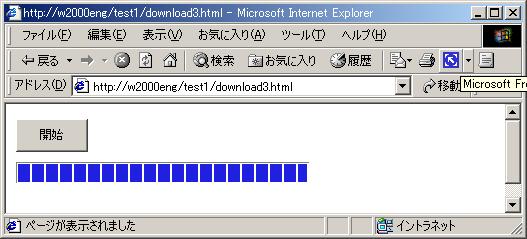
FTPサーバからダウンロードするサンプルを以下に示します。
Hiddenパラメータを使って開始ボタンとプログレスバーのみ表示します。
 ----------------- download3.html -------------------------------------------
<HTML><BODY>
<OBJECT ID="BFUP" HEIGHT=100 WIDTH=300
CLASSID="CLSID:xxxxxxxx-xxxx-xxxx-xxxx-xxxxxxxxxxxx">
<PARAM NAME="BarColor" VALUE="#2020E0">
<PARAM NAME="BarHeight" VALUE="22">
<PARAM NAME="BarWidth" VALUE="294">
<PARAM NAME="Encode" VALUE="euc-sjis">
<PARAM NAME="Exec" VALUE="DownLoad">
<PARAM NAME="FilePath" VALUE="c:\temp">
<PARAM NAME="Hidden" VALUE="22">
<PARAM NAME="TransParent" VALUE="1">
<PARAM NAME="URL" VALUE="ftp://user1:pass1@server/test1/good.jpg">
</OBJECT>
</BODY></HTML>
----------------- download3.html -------------------------------------------
<HTML><BODY>
<OBJECT ID="BFUP" HEIGHT=100 WIDTH=300
 CLASSID="CLSID:xxxxxxxx-xxxx-xxxx-xxxx-xxxxxxxxxxxx">
    <PARAM NAME="BarColor" VALUE="#2020E0">
    <PARAM NAME="BarHeight" VALUE="22">
    <PARAM NAME="BarWidth" VALUE="294">
    <PARAM NAME="Encode" VALUE="euc-sjis">
    <PARAM NAME="Exec" VALUE="DownLoad">
    <PARAM NAME="FilePath" VALUE="c:\temp">
    <PARAM NAME="Hidden" VALUE="22">
    <PARAM NAME="TransParent" VALUE="1">
    <PARAM NAME="URL" VALUE="ftp://user1:pass1@server/test1/good.jpg">
</OBJECT>
</BODY></HTML>
■ FTPサーバーからFTPS(FTP over SSL)でダウンロード
FTPサーバからFTPS(FTP over SSL)でダウンロードするサンプルを以下に示します。
Hiddenパラメータを使って開始ボタンとプログレスバーのみ表示します。
----------------- download3s.html -------------------------------------------
<HTML><BODY>
<OBJECT ID="BFUP" HEIGHT=100 WIDTH=300
 CLASSID="CLSID:xxxxxxxx-xxxx-xxxx-xxxx-xxxxxxxxxxxx">
    <PARAM NAME="BarColor" VALUE="#2020E0">
    <PARAM NAME="BarHeight" VALUE="22">
    <PARAM NAME="BarWidth" VALUE="294">
    <PARAM NAME="Encode" VALUE="euc-sjis">
    <PARAM NAME="Exec" VALUE="DownLoad">
    <PARAM NAME="FilePath" VALUE="c:\temp">
    <PARAM NAME="Hidden" VALUE="22">
    <PARAM NAME="TransParent" VALUE="1">
    <PARAM NAME="URL" VALUE="ftps://user1:pass1@server/test1/good.jpg">
</OBJECT>
</BODY></HTML>
■ ダウンロード完了をサーバに通知するには
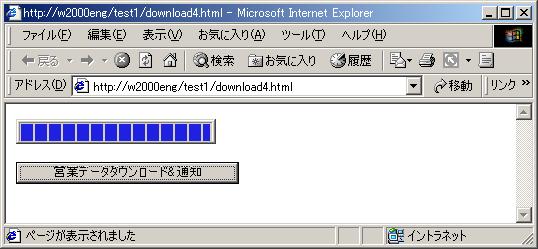
ダウンロード後にサーバサイドのスクリプトにダウンロード完了を通知します。
DownLoadメソッドの第2パラメータに "/dev/null" を指定すると
DownLoadメソッドの結果をファイルに保存しません。
 ----------------- download4.html -------------------------------------------
<HTML><BODY>
<OBJECT ID="BFUP" HEIGHT=25 WIDTH=200
CLASSID="CLSID:xxxxxxxx-xxxx-xxxx-xxxx-xxxxxxxxxxxx">
<PARAM NAME="BarColor" VALUE="#2020E0">
<PARAM NAME="BarHeight" VALUE="22">
<PARAM NAME="BarWidth" VALUE="194">
<PARAM NAME="Hidden" VALUE="23">
</OBJECT>
<SCRIPT LANGUAGE="VBScript">
Sub File1_onClick()
filepath = "d:\excel"
para = "?f=eigyo"
url = "filedown2.asp" & para
rc = BFUP.DownLoad(url,filepath)
url = "filepost1.asp" & para & "&rc=" & rc
rc = BFUP.DownLoad(url,"/dev/null")
End Sub
</SCRIPT>
<BR><BR>
<input type=button name=File1 value="営業データダウンロード&通知">
</BODY></HTML>
----------------- download4.html -------------------------------------------
<HTML><BODY>
<OBJECT ID="BFUP" HEIGHT=25 WIDTH=200
 CLASSID="CLSID:xxxxxxxx-xxxx-xxxx-xxxx-xxxxxxxxxxxx">
    <PARAM NAME="BarColor" VALUE="#2020E0">
    <PARAM NAME="BarHeight" VALUE="22">
    <PARAM NAME="BarWidth" VALUE="194">
    <PARAM NAME="Hidden" VALUE="23">
</OBJECT>
<SCRIPT LANGUAGE="VBScript">
Sub File1_onClick()
  filepath = "d:\excel"
  para = "?f=eigyo"
  url = "filedown2.asp" & para
  rc = BFUP.DownLoad(url,filepath)
  url = "filepost1.asp" & para & "&rc=" & rc
  rc = BFUP.DownLoad(url,"/dev/null")
End Sub
</SCRIPT>
<BR><BR>
<input type=button name=File1 value="営業データダウンロード&通知">
</BODY></HTML>
結果の通知を実行するASPスクリプトのサンプルを示します。
----------------- filepost1.asp -------------------------------------------
<%
ftype = Request.QueryString("f")
rc = Request.QueryString("rc")
' 通知処理
%>
<HTML><HEAD><TITLE>File POST</TITLE>
<BODY>
<H1>Testing</H1>
<BR>
ftype= <%= ftype %><BR>
rc= <%= rc %><BR>
</BODY></HTML>
[ホーム] [会社概要]
[製品]
[サポート]
[BFup Pro ActiveX] [FAQ] [アプリケーションガイド]
[ユーザガイド] [リファレンス]
Copyright © 2002-2017 B21Soft, Inc. All Rights Reserved.