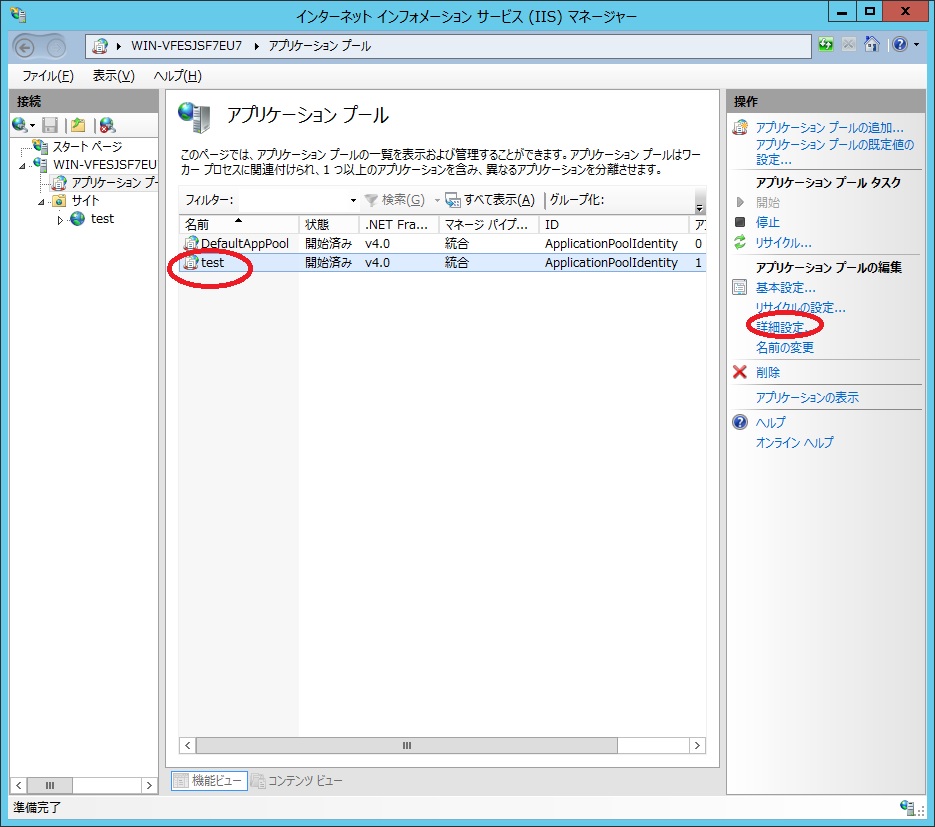
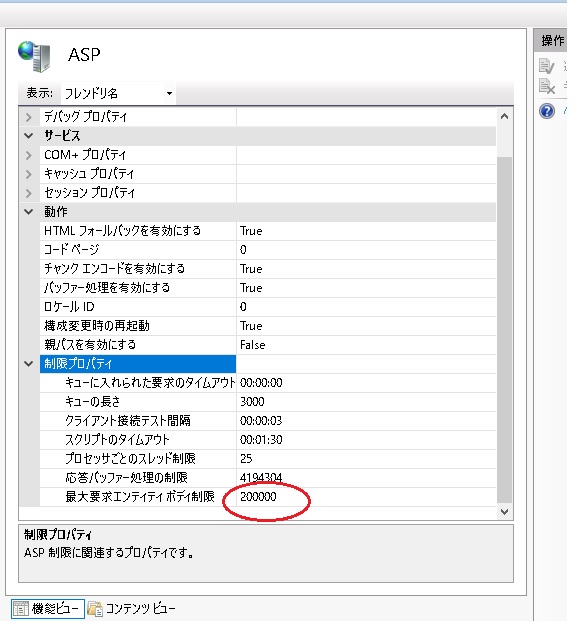
IISマネージャで設定します。
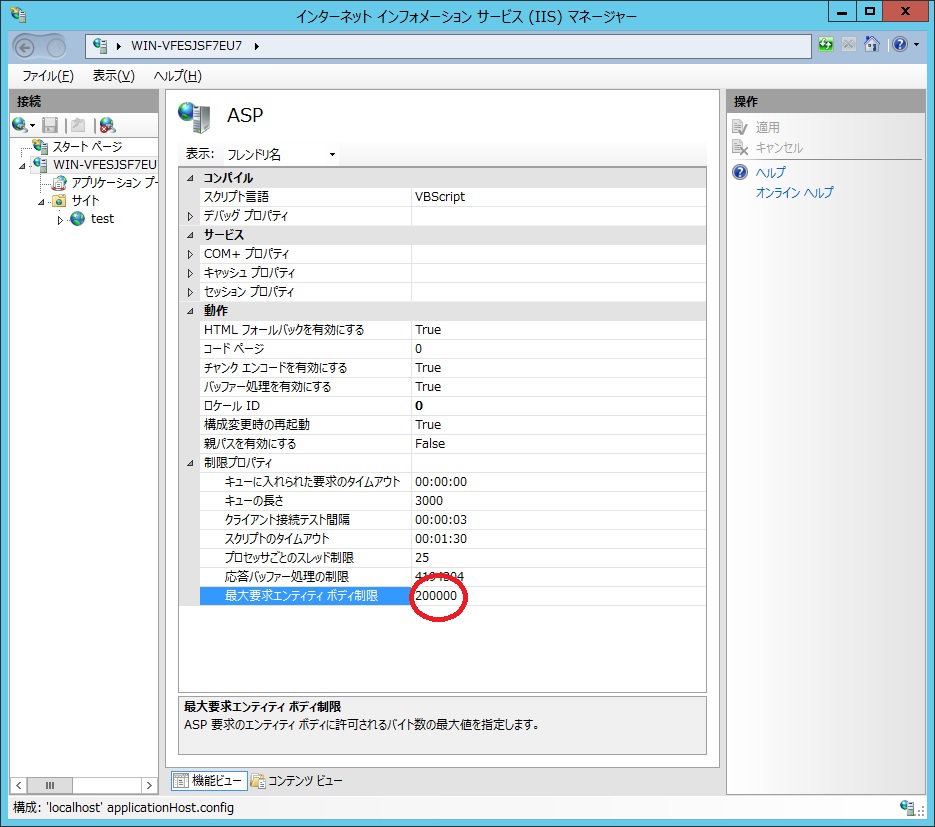
[ASP]をクリック[制限プロパティ]-[最大要求エンティティボディ制限] 初期値が200000バイト(200KB) この値を変更します。

・ライセンスキー
・ライセンス証書
ご使用方法の問合せ
不具合の問合せ サポートセンター
マイナーバージョンアップ版のダウンロード
ご購入日から1年後にサポート延長をご希望の場合は:
サポートライセンス:1年間 \50,000(+消費税)。があります。
| マニュアル名 | 説明 |
| BASP21 Proユーザガイド | ASPやIEなどのさまざまな環境での使用方法を解説。 |
| BASP21 Proアプリケーションガイド | メール送受信やファイルアップロード機能などのアプリケーション開発方法を解説。 |
| BASP21 Proリファレンス | メソッドやプロパティの解説。 |
| BASP21 Proソケットオブジェクト | BASP21 Proソケットオブジェクトドキュメント。 |
| BASP21 Pro FTPオブジェクト | BASP21 Pro FTPオブジェクトドキュメント。 |
| BASP21 Proリリースノート | リリースノート(不具合修正情報など)、インストール、アンインストール、バージョンアップ 方法などを説明。 インストールファイルに含まれます。 |
| BASP21 Pro FAQ | よくある質問。本ドキュメント。 |
| 項目 | 説明 |
| ハードウエア | x64アーキテクチャ。 |
| OS |
Windows 2016,Windows 2019,Windows 2022,Windows 2025 Windows 11 |
| IIS | IIS7.5/IIS8/IIS10.0。 |
| ホスト | ASP、ASP.NET、IE 6以上、WSH、VBA、Visual Basic 6.0、Visual C++ /6.0、 Visual Studio 2012/2013/2015/2017/2019/2022 |
Base64 BinaryConcat BinaryRead BinaryWrite ByteArray Debug DebugClear FileCheck
Form FormBinary FormFileName FormFileSize FormSaveAs HAN2ZEN Kconv
KconvFile MD5 MidB ReadDir ReadMail RepTagChar Sleep Sort SortMail StrConv CodePage Version
上記のメソッドを使っている場合は、PROGID "basp21"を"basp21pro"に変更するだけです。
ソケットオブジェクトを使っている場合は、PROGID "basp21.socket"を"basp21pro.socket"に 変更するだけです。Set bobj = Server.CreateObject("basp21")Set bobj = Server.CreateObject("basp21pro")
以下のメソッドは、パラメータの変更が必要です。Set bsocket = Server.CreateObject("basp21.socket")Set bsocket = Server.CreateObject("basp21pro.socket")Set bftp = Server.CreateObject("basp21.ftp")Set bftp = Server.CreateObject("basp21pro.ftp")
以下のBASP21メソッドは、BASP21 Proではサポートされません。rc = bobj.Execute(cmd,mode,stdout)stdout = bobj.Execute(cmd,mode)output = bobj.RcvMail(svname,user,pass,command,dirname)output = bobj.RcvMail(user,pass,command[,dirname])msg = bobj.SendMail(svname,mailto,mailfrom,subj,body,files)rc = bobj.SendMail(mailto,subj,body[,files])
Counter GetTempFile SendMailEx Match Replace Translate Split FGrep SplitB sprintf strftime Space IsNum MatchEx W3get MatchB Execute2
| 項目 | BASP21 | BASP21 Pro |
| サポートの有無 | なし。 | あり。メールにて。レスポンス保証。 |
| PROGID | basp21 | basp21pro |
| インストール場所 |
システムディレクトリ固定。 2000 c:\winnt\system32 |
任意なディレクトリ |
| インストール方法 |
regsvr32 パス名\basp21.dll |
インストーラ提供。 手動でも可能。 regsvr32 basp21p.dll regsvr32 bsocket.dll regsvr32 bftp.dll regsvr32 x64\basp21p.dll regsvr32 x64\bsocket.dll regsvr32 x64\bftp.dll |
| 64ビット版提供 | なし | あり |
| IPv6サポート | なし | あり。デュアルスタックモードで動作。 |
| BASP21 Proでの新規メソッド | - |
BinaryComp Bsendm
Cancel Diff DownLoad Monitor Process PutLog ReadLog SecureFile SortFile UpLoad |
| プロパティ | CodePage Result のみ |
Env FireEvent
Home IsError LastMsg MailBox MailFrom MailOption MailQueue PopServer Result Server ShowDialog Trap |
| イベント | なし | OnLog OnProgress |
| BASP21Proでは削除されたメソッド | - | Counter GetTempFile SendMailEx Match Replace Translate Split FGrep SplitB sprintf strftime Space IsNum MatchEx W3get MatchB Execute2 |
| 環境設定機能 | なし | あり。Envプロパティにより、 サーバー名などの環境依存をスクリプトから開放。 |
| モニター機能 | なし | あり。Monitorメソッドにより、 他のプロセスでのメソッド進捗などをモニター可能。 |
| Cancel機能 | なし | あり。Cancelメソッドにより、 他のプロセスでのメソッドを中断可能。 |
| ログ機能 | メール送信時のログ。 | すべてのメソッド、プロパティの実行結果、処理時間。エラー詳細、ユーザログ。 ログレコードを参照。 |
| ファイルアップロード機能(サーバーサイド) | あり | あり。FormSaveAsで上書き禁止モード、追加モード。プログレス表示可能。 |
| ファイルアップロード機能(クライアントサイド) | あり。別途BFup ActiveXコントロールにて。 | あり。HTTP/FTPモード。HTTPモードで分割送信可能(2GB以上のファイルサイズもOK)なUpLoadメソッド。 |
| ファイルダウンロード機能 | W3Getメソッド。 | DownLoadメソッド。リジューム機能あり。 |
| SSL(https)機能 | なし | UpLoad/DownLoadメソッド、ソケットオブジェクトでサポート。 |
| SMTPS(SMTP over SSL)、POP3S(POP3 over SSL)機能 | なし | SendMail/FlushMail/RcvMailメソッドでサポート。 |
| FTPS(FTP over SSL)機能 | なし | FTPオブジェクトでサポート。 |
| 進捗ダイアログ表示機能 | なし | あり。ShowDialogプロパティによるダイアログ表示。 |
| メール送信方式 | 1通ごとにSMTPサーバーにコネクト。 | 新たにSMTPサーバーに1回のみコネクト(FlushMail/Bsendm)モード追加。 |
| FlushMailメソッド別プロセスモード機能 | あり。サーバー名の前に'&' をつけると別プロセスモード。 | なし。'&' をつけると -26 サーバコネクトエラー。 |
| ReadDirメソッドで該当ファイルなしの戻り値 | 配列を返す。 | 数値0を返す。compatパラメータで配列を返すように変更可能。 |
| RcvMailメソッド受信最大数 | 256 | 32768 |
| メール再送機能 | なし | あり。FlushMailメソッド。 |
| 差込みメール機能 | あり。bsendm.exe。 | あり。Bsendmメソッド。 メールファイル+FlushMailメソッドでも可能。 |
| コマンドラインからメソッド実行 | なし | あり。BHELPER.EXE。 コマンド実行結果をクリップボードにコピー可能。 |
| メソッド制限機能 | なし | あり。allowパラメータで環境設定可能。 |
| エラートラップ機能 | なし | あり。Trapプロパティでエラー時にスクリプト中断可能。 |
| お勧め新機能 | - |
ShowDialogプロパティによるダイアログ表示。 Monitorメソッドによるメソッド監視。 Cancelメソッドによるメソッドのキャンセル。 UpLoadメソッドによるクライアントからファイルアップロード。 SecureFileメソッドによるファイル監視機能 Diffメソッドによるファイル差分 |
| Windows 7 / Windows Server 2008 R2 Windows 8 / Windows Server 2012/2016/2019/2022サポート | - | あり |
regsvr32 c:\b21pro\basp21p.dllIEでBASP21P.CAB ファイルからインストールする場合にはシステムディレクトリにインストールされます。 BASP21P.CABファイルについてはIEによる自動インストールを参照。
c:\b21pro\bhelper -v-e を使うとBASP21P.INIファイルの設定を確認できます。
c:\b21pro\bhelper -v -e env1
c:\b21pro\bhelper -vまたは Versionプロパティを参照します。
ver = bobj.Version
fileshare=1
rc = bobj.FlushMail(svr,dirname)
スクリプト内で連続してメソッドを実行している場合は、Resultプロパティを適切に 参照してスクリプトを終了させるようにしておく必要があります。
bobj.FlushMail If bobj.Result < 0 Then
パラメータのURLに"http://" の代わりに"https://" を使うだけでSSL暗号化通信ができます。 ソケット オブジェクトでも使えます。
c:\b21pro\bhelper -vダイアログが表示されれば正常にインストールされています。 次に、BASP21P.INIファイルが 適切に作成されているかEnv名を指定してBHELPER.EXEを実行します。
c:\b21pro\bhelper -e env1 -v次に、該当メソッドの実行が許可されているかどうか確認します。 ダイアログの表示内容で allowパラメータ の内容を確認してください。
以下のようにlogfileパラメータを[global]セクションにも指定すれば最初からログが取れます。
----------------- basp21p.ini ------------------------------------------- [global] allow=env logfile=c:\temp\log.txt [env1] allow=sendmail,rcvmail,readmail,showdialog logfile=c:\temp\log.txt
[ASP]をクリック[制限プロパティ]-[最大要求エンティティボディ制限] 初期値が200000バイト(200KB) この値を変更します。
rc = bftp.Connect("TLS ftp.server","user","pass") ' FTPS (AUTH TLS)通信
bobj.Server = "SSL hostname" ' STARTTLS bobj.Server = "hostname:465" ' SMTP over SSL bobj.PopServer = "SSL hostname" ' STLS bobj.PopServer = "hostname:995" ' POP3 over SSL
1. Start Registry Editor (Regedt32.exe). 2. Locate and then click the following registry key: HKEY_CURRENT_USER\Software\Microsoft\Windows\CurrentVersion\Internet Settings 3. On the Edit menu, click Add Value, and then add the following registry value: Value name: SocketSendBufferLength Data type: REG_DWORD Radix: Decimal Value data: Buffer size that you want (in bytes) Buffer size value options: 16-KB Buffer = 16384 24-KB Buffer = 24576 32-KB Buffer = 32768 40-KB Buffer = 40960 48-KB Buffer = 49152 56-KB Buffer = 57344 64-KB Buffer = 65536 4. Quit Registry Editor. Make sure that you test each value, starting with a 16-KB buffer. When the upload performance becomes acceptable, select the corresponding buffer value.
<%
Server.ScriptTimeout = 60*30 ' タイムアウト30分
set bobj = Server.Createobject("basp21pro")
bobj.env="env1"
fname="1999mb.zip" ' ファイルサイズは2GB -1 まで可能
filename="c:\temp\" & fname
offset = 0
rlen = 1024*1024*10 ' 10MBずつ読込み
flen = bobj.FileCheck(filename)
dlen = 0
readlen = 0
Response.Buffer = False ' バッファリングしない
Response.ContentType = "application/octet-stream;name=" & fname
Response.AddHeader "Accept-Ranges", "bytes"
Response.AddHeader "Content-Disposition","attachment;filename=" & fname
Response.AddHeader "Content-Length",flen ' IIS 7.5 ではContent-Lengthはコメントにすること
Do While dlen < flen
dat = bobj.binaryread(filename,offset,rlen)
rc = bobj.result
If rc < 0 Then Exit Do ' 読込みエラー
Response.BinaryWrite dat
If Not Response.IsClientConnected() Then Exit Do ' 切断の場合、処理中断
bobj.Sleep 4 ' 4秒待つ サーバの負荷状態で待ち秒数を増減
readlen = readlen + rc
offset = offset + rlen
If (flen - offset) < rlen Then rlen = flen - offset
dlen = dlen + rlen
If rlen <= 0 Then exit do
Loop
%>
Response.BinaryWriteメソッドを連続して発行すると、サーバーに負荷がかかり、
サーバが不安定になりますので、Sleepメソッドで発行間隔を空ける必要があります。
IIS7.5では、Content-Lengthヘッダーを指定するとページが異常終了します。
これは、7.5ではContent-Lengthヘッダーを内部で作成しているようで、
Content-Lengthヘッダーを指定すると2重に指定したことになるためです。
エラーチェックが厳密になったようです。
updatabytes = Request.BinaryRead(Request.TotalBytes) 予期しないエラーです。関数が | を返しました。Windows 2008 サーバーでは、70MB以上のファイルのアップロードでこのエラーが発生します。 原因は、IISのリソース不足のようですが、残念ながらこの上限値を拡張する方法は、ございません。
----------------- hugeupload.html ------------------------------------------- <HTML><BODY> <FORM ACTION="hugeupload.asp" ENCTYPE="multipart/form-data" METHOD=POST> Para: <INPUT TYPE=TEXT NAME="Para"><BR> Huge File: <INPUT TYPE=file NAME="file001"><BR> <INPUT TYPE=SUBMIT NAME=UPLOAD> </FORM></BODY></HTML>
----------------- hugeupload.asp -------------------------------------------
<%
starttime = Now()
Server.ScriptTimeout=72000
totalbytes=Request.Totalbytes
bufferlen = 1024 * 1024 ' バッファ長 1MB
rlen = bufferlen
b=Request.BinaryRead(rlen)
set bobj = Server.Createobject("basp21pro")
bobj.Env = "env1"
fname = bobj.FormFileName(b,"file001") ' 1回目のBinaryRead後に呼出し
para = bobj.Form(b,"Para") ' 1回目のBinaryRead後に呼出し
fpath = "c:\temp" & Mid(fname,InstrRev(fname,"\"))
rc = bobj.FormSaveAs(b,"file001",fpath,4) '最初の呼出しでは 4 指定
filelen = rc
readlen = rlen
Do While readlen < totalbytes And rc >= 0
If Not Response.IsClientConnected() Then ' キャンセル?
rc = bobj.FormSaveAs(b,"file001",fpath,6) ' ファイル削除
Exit Do
End If
rlen = bufferlen
On Error Resume Next
b=Request.BinaryRead(rlen)
If Err.number <> 0 then
rc = bobj.FormSaveAs(b,"file001",fpath,6) ' ファイル削除
Exit Do
End If
On Error Goto 0
readlen = readlen + rlen
rc = bobj.FormSaveAs(b,"file001",fpath,5) '2回目以降の呼出しでは 5 指定
filelen = filelen + rc
Loop
%>
<HTML>
<BODY>
処理秒数: <%= DateDiff("s",starttime,now()) %><BR>
totalbytes: <%= totalbytes %><BR>
readlen: <%= readlen %><BR>
fname: <%= fname %><BR>
Para: <%= Para %><BR>
fpath: <%= fpath %><BR>
filelen: <%= filelen %><BR>
rc: <%= rc %><BR>
</BODY>
</HTML>
Request.BinaryRead複数呼出し処理では、以下の点にご注意ください。
1. FormSaveAsメソッドで処理可能なファイルは、1つのみです。 2. FormおよびFormFileNameメソッドは、初回のRequest.BinaryReadメソッドのバイト配列データに 対してのみ実行可能です。 3. 初回のRequest.BinaryReadメソッドのバイト配列データに対しては、 FormSaveAsメソッドは、処理モード 4 を指定する必要があります。 2回目以降は、処理モード 5 を指定する必要があります。 4. FormSaveAsメソッドの戻り値は、1回の呼出しで書込んだバイト数です。 FormSaveAsメソッドの戻り値の合計が、ファイルサイズを示します。 5. FormFileSize、FormBinaryメソッドは、使用できません。 6. Request.Totalbytesメソッドの戻り値の大きさだけ、 Request.BinaryReadメソッドを使ってすべて読込む必要があります。 7. Request.BinaryRead複数呼出し処理対応の FormSaveAsメソッドは、 バージョン 1,0,806,5 以降でサポートされます。


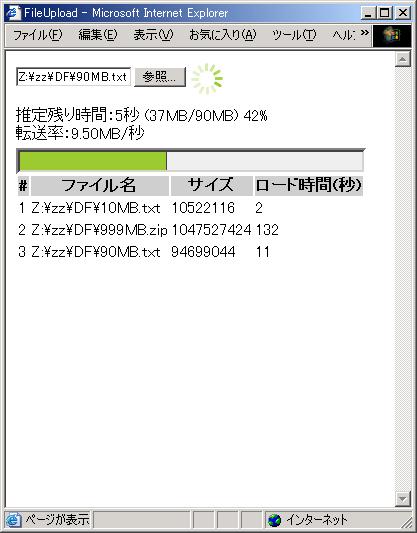
----------------- upload.html -------------------------------------------
<html><head><title>FileUpload</title></head>
<body>
<div id=img STYLE="POSITION:absolute;LEFT:185px;TOP:12px;visibility:hidden">
<img src=loader.gif></div>
<script type="text/javascript">
var status = "";
var errcount = 0;
function ajax_show_upload_status(status) {
var now = new Date();
var sec_time = parseInt((now.getTime() - starttime.getTime()) / 1000);
var ar = status.split("/");
var persent = parseInt(ar[0]);
if (persent < 0) {
if (errcount < 1) {
setTimeout('callajax()', 1000);
}
errcount = errcount + 1;
return true;
}
var nowsize_kb = parseInt(ar[1]);
var totalsize_kb = parseInt(ar[2]);
if (persent >= 100 || totalsize_kb == 0 ) {
document.getElementById("img").style.visibility = "hidden";
document.getElementById("estimate").innerHTML="";
document.getElementById("transferrate").innerHTML="";
setTable(document.getElementById("filename").innerHTML,persent,sec_time)
document.forms["form"]["submit"].style.visibility = "visible";
return;
}
var remain_kb = totalsize_kb - nowsize_kb;
var parsec_kb = parseInt(nowsize_kb / sec_time);
var remain_sec = "";
if (parsec_kb > 0) {
remain_sec = parseInt(remain_kb / parsec_kb);
document.getElementById("estimate").innerHTML="推定残り時間:" + remain_sec +
"秒 (" + parseInt(nowsize_kb/1024) +
"MB/" + parseInt(totalsize_kb/1024) + "MB) " + persent + "%";
var parsec_mb = parsec_kb/1024;
document.getElementById("transferrate").innerHTML="転送率:" + parsec_mb.toFixed(2) + "MB/秒";
}
document.getElementById("progressBar").style.display = "block";
if (persent > 0)
document.getElementById("progressBarBoxContent").style.width =
parseInt(persent * 3.5) + "px";
setTimeout('callajax()', 1000);
return true;
}
var filenamepara = "";
var starttime = null;
function start_upload() {
starttime = new Date();
status = "";
errcount = 0;
document.getElementById("filename").innerHTML
= document.forms["form"]["file001"].value;
filenamepara = escape(document.forms["form"]["file001"].value);
if (filenamepara == null || filenamepara == "")
return false;
document.getElementById("progressBarBoxContent").style.width =0;
document.getElementById("img").style.visibility = "visible";
document.forms["form"]["submit"].style.visibility = "hidden";
setTimeout('callajax()', 2000);
return true;
}
var xmlhttp = null;
function createXMLHttpRequest()
{
var httpreq;
try {
if (window.XMLHttpRequest) {
httpreq = new XMLHttpRequest();
} else if (window.ActiveXObject) {
httpreq = new ActiveXObject("Msxml2.XMLHTTP");
if (!httpreq) {
httpreq = new ActiveXObject("Microsoft.XMLHTTP");
}
}
} catch (e) {}
return httpreq;
}
function callajax() {
xmlhttp = createXMLHttpRequest();
if (xmlhttp) {
xmlhttp.onreadystatechange = setPageData;
var now = new Date();
var time = parseInt(now.getTime());
var url = 'progress.asp?fname=' + filenamepara + "&t=" + time;
xmlhttp.open('GET', url);
xmlhttp.send(null);
} else {
alert("cannot get xmlhttp object");
}
}
function setPageData() {
if (xmlhttp.readyState == 4 && xmlhttp.status == 200) {
status = xmlhttp.responseText;
ajax_show_upload_status(status);
}
}
var count = 0;
function setTable(fname,size,time) {
var tabid = 'uploadTable';
var targetTable = document.getElementById(tabid);
var row = targetTable.insertRow(count+1);
count = count + 1
var cell = row.insertCell(-1);
var text = count;
cell.appendChild(document.createTextNode(text));
cell = row.insertCell(-1);
cell.appendChild(document.createTextNode(fname));
cell = row.insertCell(-1);
cell.appendChild(document.createTextNode(size));
cell = row.insertCell(-1);
cell.appendChild(document.createTextNode(time));
}
</script>
<style type="text/css">
#progressBar {padding-top: 5px;}
#progressBarBox {width: 350px; height: 12px; border:inset; background: #eee;}
#progressBarBoxContent {width: 0; height: 12px; border-right: 1px solid #444;
background: #9ACB34;}
</style>
<form id="form" action="afileup.asp" target="upload_frame"
enctype="multipart/form-data" method="post"
onsubmit="start_upload()">
<input type="file" name="file001" value="Upload File">
<input type="submit" name="submit" value="Upload">
</form>
<div id="estimate"></div>
<div id="transferrate"></div>
<div id="progressBar" style="display:none;"></div>
<div id="progressBarBox"><div id="progressBarBoxContent"></div></div>
<table id="uploadTable" style="visibility:visible">
<tr bgcolor="#cccccc">
<th>#</th>
<th>ファイル名</th>
<th>サイズ</th>
<th>ロード時間(秒)</th>
</tr>
</table>
<div id="filename" style="display:none;"></div>
<iframe name="upload_frame" style="display:none;"></iframe>
</body>
</html>
----------------- afileup.asp -------------------------------------------
<%@ Language=VBScript EnableSessionState=False %>
<%
starttime = Now()
Server.ScriptTimeout=72000
totalbytes=Request.Totalbytes
bufferlen = 1024 * 1024 ' 1MB
rlen = bufferlen
b=Request.BinaryRead(rlen)
set bobj = Server.Createobject("basp21pro")
bobj.Env = "env1"
fname = bobj.FormFileName(b,"file001")
if InstrRev(fname,"\") > 0 then
fpath = "c:\temp" & Mid(fname,InstrRev(fname,"\"))
else
fpath = "c:\temp\" & fname ' firefox have no path
end if
rc = bobj.FormSaveAs(b,"file001",fpath,totalbytes) ' say totalbytes to BASP21
rc = bobj.FormSaveAs(b,"file001",fpath,4)
filelen = rc
readlen = rlen
Do While readlen < totalbytes And rc >= 0
rlen = bufferlen
On Error Resume Next
b=Request.BinaryRead(rlen)
If Err.number <> 0 then
rc = bobj.FormSaveAs(b,"file001",fpath,6) ' delete file
Exit Do
End If
On Error Goto 0
readlen = readlen + rlen
rc = bobj.FormSaveAs(b,"file001",fpath,5)
filelen = filelen + rc
Loop
aa = DateDiff("s",starttime,now())
%>
<HTML>
<BODY>
process time: <%= aa %><BR>
totalbytes: <%= totalbytes %><BR>
readlen: <%= readlen %><BR>
fname: <%= fname %><BR>
fpath: <%= fpath %><BR>
filelen: <%= filelen %><BR>
rc: <%= rc %><BR>
</BODY>
</HTML>
----------------- progress.asp -------------------------------------------
<%@ Language=VBScript EnableSessionState=False %>
<%
set bobj = Server.Createobject("basp21pro")
bobj.Env = "env1"
fname = Request.QueryString("fname")
if instrrev(fname,"\") > 0 Then
fname = Mid(fname,InstrRev(fname,"\")+1)
end if
fpath = "c:\temp\" & fname
totalbytes = 0
persent = -1
nowsize = bobj.FileCheck(fpath) ' get current file size
if nowsize > 0 then
ar = bobj.ReadDir(fpath & "-Length-*") ' find status file
if IsArray(ar) then
totalbytes = Mid(ar(0),InstrRev(ar(0),"-")+1) ' get total bytes
End If
if totalbytes > 0 Then
persent = int(nowsize*100 / totalbytes) ' calc persent
else
persent = nowsize
end if
End If
putdata = persent & "/" & int(nowsize/1024) & "/" & int(totalbytes/1024)
Response.AddHeader "Content-Length", Len(putdata) ' may be faster
Response.AddHeader "ContentType", "text/plain"
Response.Expires = -1
Response.AddHeader "Cache-Control", "No-Cache" ' say DO NOT cache
Response.AddHeader "Pragma", "No-Cache"
Response.CacheControl = "Private"
Response.Write putdata
Response.End
%>
1. Ajax で非同期に呼ばれる ASPファイルは、EnableSessionState=False を指定しない場合、 アップロードを処理するASPファイルと異なるIIS仮想フォルダに配置しないと並行処理されません。 2. FormSaveAsメソッドで処理可能なファイルは、1つのみです。 3. FormおよびFormFileNameメソッドは、初回のRequest.BinaryReadメソッドのバイト配列データに 対してのみ実行可能です。 4. 初回のRequest.BinaryReadメソッドのバイト配列データに対しては、 FormSaveAsメソッドは、処理モード 4 を指定する必要があります。 2回目以降は、処理モード 5 を指定する必要があります。 5. FormSaveAsメソッドの戻り値は、1回の呼出しで書込んだバイト数です。 FormSaveAsメソッドの戻り値の合計が、ファイルサイズを示します。 6. FormFileSize、FormBinaryメソッドは、使用できません。 7. Request.Totalbytesメソッドの戻り値の大きさだけ、 Request.BinaryReadメソッドを使ってすべて読込む必要があります。 8. Request.BinaryRead複数呼出し処理対応の FormSaveAsメソッドは、 バージョン 1,0,806,5 以降でサポートされます。 9. プログレス対応のFormSaveAsメソッドは、 バージョン 1,0,806,16 以降でサポートされます。
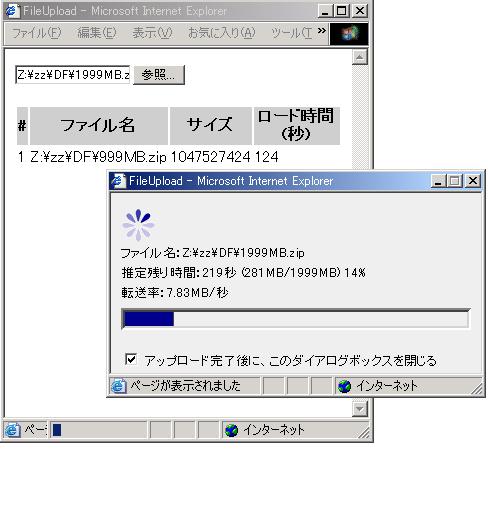
----------------- upload2.html -------------------------------------------
<html><head>
<title>FileUpload</title>
</head><body>
<script type="text/javascript">
function start_upload() {
var filenamepara = "";
filenamepara = escape(document.forms["form"]["file001"].value);
if (filenamepara == null || filenamepara == "")
return false;
var url = "progwin.asp?fname=" + filenamepara;
document.forms["form"]["submit"].style.visibility = "hidden";
window.open(url,"Progress",
"toolbar=no,location=no,directories=no,status=yes,scrollbars=no,resizable=no,width=360,height=180")
return true;
}
var count = 0;
function setTable(fname,size,time) {
var tabid = 'uploadTable';
var targetTable = document.getElementById(tabid);
var row = targetTable.insertRow(count+1);
count = count + 1
var cell = row.insertCell(-1);
var text = count;
cell.appendChild(document.createTextNode(text));
cell = row.insertCell(-1);
cell.appendChild(document.createTextNode(fname));
cell = row.insertCell(-1);
cell.appendChild(document.createTextNode(size));
cell = row.insertCell(-1);
cell.appendChild(document.createTextNode(time));
}
</script>
<form id="form" action="afileup.asp" target="upload_frame"
enctype="multipart/form-data" method="post"
onsubmit="start_upload()">
<input type="file" name="file001" value="Upload File">
<input type="submit" name="submit" value="Upload">
</form>
<iframe name="upload_frame" style="display:none;"></iframe>
<table id="uploadTable" style="visibility:visible">
<tr bgcolor="#cccccc">
<th>#</th>
<th>ファイル名</th>
<th>サイズ</th>
<th>ロード時間(秒)</th>
</tr>
</table>
</body>
</html>
----------------- progwin.asp -------------------------------------------
<%@ Language=VBScript EnableSessionState=False %>
<%
fname = Request.QueryString("fname")
fname = Replace(fname,"\","\\")
%>
<html><head>
<title>FileUpload</title>
<style type="text/css">
BODY{font-size:10pt;}
</style>
</head>
<body onLoad="start_upload()" bgcolor="#eeeeee">
<script type="text/javascript">
var status = "";
var errcount = 0;
function ajax_show_upload_status(status) {
var now = new Date();
var sec_time = parseInt((now.getTime() - starttime.getTime()) / 1000);
var ar = status.split("/");
var persent = parseInt(ar[0]);
if (persent < 0) {
if (errcount < 1) {
setTimeout('callajax()', 1000);
}
errcount = errcount + 1;
return true;
}
var nowsize_kb = parseInt(ar[1]);
var totalsize_kb = parseInt(ar[2]);
if (persent >= 100 || totalsize_kb == 0 ) {
document.getElementById("img").style.visibility = "hidden";
document.getElementById("estimate").innerHTML="アップロード時間:" +
sec_time + "秒 " + parseInt(persent/1024/1024) + "MB ";
if( window.opener && !window.opener.closed ){
window.opener.setTable(filename,persent,sec_time)
window.opener.document.forms["form"]["submit"].style.visibility = "visible";
}
if (document.forms["closeform"]["closeflag"].checked)
window.close();
return;
}
var remain_kb = totalsize_kb - nowsize_kb;
var parsec_kb = parseInt(nowsize_kb / sec_time);
var remain_sec = "";
if (parsec_kb > 0) {
remain_sec = parseInt(remain_kb / parsec_kb);
document.getElementById("estimate").innerHTML="推定残り時間:" + remain_sec +
"秒 (" + parseInt(nowsize_kb/1024) +
"MB/" + parseInt(totalsize_kb/1024) + "MB) " + persent + "%";
var parsec_mb = parsec_kb/1024;
document.getElementById("transferrate").innerHTML="転送率:" + parsec_mb.toFixed(2) + "MB/秒";
}
document.getElementById("progressBar").style.display = "block";
if (persent > 0)
document.getElementById("progressBarBoxContent").style.width =
parseInt(persent * 3.5) + "px";
setTimeout('callajax()', 1000);
return true;
}
var filename = "";
var filenamepara = "";
var starttime = null;
function start_upload() {
starttime = new Date();
status = "";
errcount = 0;
filename = "<%= fname %>";
document.getElementById("filename").innerHTML = "ファイル名:" + filename;
filenamepara = escape(filename);
if (filenamepara == null || filenamepara == "")
return false;
document.getElementById("progressBarBoxContent").style.width =0;
document.getElementById("img").style.visibility = "visible";
setTimeout('callajax()', 2000);
return true;
}
var xmlhttp = null;
function createXMLHttpRequest()
{
var httpreq;
try {
if (window.XMLHttpRequest) {
httpreq = new XMLHttpRequest();
} else if (window.ActiveXObject) {
httpreq = new ActiveXObject("Msxml2.XMLHTTP");
if (!httpreq) {
httpreq = new ActiveXObject("Microsoft.XMLHTTP");
}
}
} catch (e) {}
return httpreq;
}
function callajax() {
xmlhttp = createXMLHttpRequest();
if (xmlhttp) {
xmlhttp.onreadystatechange = setPageData;
var now = new Date();
var time = parseInt(now.getTime());
var url = 'progress.asp?fname=' + filenamepara + "&t=" + time;
xmlhttp.open('GET', url);
xmlhttp.send(null);
} else {
alert("cannot get xmlhttp object");
}
}
function setPageData() {
if (xmlhttp.readyState == 4 && xmlhttp.status == 200) {
status = xmlhttp.responseText;
ajax_show_upload_status(status);
}
}
</script>
<style type="text/css">
#progressBar {padding-top: 5px;}
#progressBarBox {width: 350px; height: 12px; border:inset; background: #eeeeee;}
#progressBarBoxContent {width: 0; height: 12px; border-right: 1px solid #444;
background: #00008b;}
</style>
<div id=img STYLE="visibility:hidden"><img src=loader.gif></div>
<span style="line-height:20px;">
<div id="filename"></div>
<div id="estimate"></div>
<div id="transferrate"></div>
</span>
<div id="progressBar" style="display:none;"></div>
<div id="progressBarBox"><div id="progressBarBoxContent"></div></div>
<FORM id="closeform">
<input type="checkbox" name="closeflag" checked>
アップロード完了後に、このダイアログボックスを閉じる
</FORM>
</body>
</html>
basp21p.iniファイルに以下のオプションを指定すると SendMailメソッドの終了後にメールサーバへの接続を切断しません。 そのため後続のSendMailメソッドは、コネクト処理をスキップしますので 送信処理が高速になります。メールサーバの切断のタイミングは、 BASP21 Proオブジェクトの終了時です。 mailoption2=bulksendmail=yes
cd C:\Inetpub\AdminScripts ... フォルダ移動 cscript adsutil.vbs get w3svc/aspmaxrequestentityallowed ... 現在の値を取得 Microsoft (R) Windows Script Host Version 5.6 Copyright (C) Microsoft Corporation 1996-2001. All rights reserved. aspmaxrequestentityallowed : (INTEGER) 204800 cscript adsutil.vbs set w3svc/aspmaxrequestentityallowed 1610612736 ... 1.5GBに値を設定 Microsoft (R) Windows Script Host Version 5.6 Copyright (C) Microsoft Corporation 1996-2001. All rights reserved. aspmaxrequestentityallowed : (INTEGER) 1610612736 iisreset ... IISを再起動します。Windows 2008 サーバーの場合は、30MB 以上アップロードするときは、 以下のmaxAllowedContentLength値の設定も必要となります。
1.5Gに変更する例: cd C:\Windows\System32\inetsrv ... フォルダ移動 appcmd set config -section:requestFiltering -requestLimits.maxAllowedContentLength:1610612736 -commitpath:apphost 構成変更を構成コミット パス "MACHINE/WEBROOT/APPHOST" の "MACHINE/WEBROOT/APPHOS T" のセクション "system.webServer/security/requestFiltering" に適用しました
パッケージの x64 フォルダに以下のBASP21 Pro 64ビット版DLL が用意されています。 basp21p.dll BFTP.dll BSocket.dll 以下の 64ビットOSで動作します。 Windows Server 2008 R2/2016/2019/2022 Windows 7/8/10/11
| OS | 32 ビットOS(x86) | 64 ビットOS(x64) | |
| アプリケーション構成 | 32 ビット | 64 ビット | 32 ビット(WOW64) |
| BASP21 Pro x86 DLL | ○ | × | ○ |
| BASP21 Pro x64 DLL | × | ○ | × |
BASP21Pro(32bit).msi .... 32ビット版のBASP21 Proをインストール BASP21Pro(64bit).msi .... 64ビット版のBASP21 ProをインストールBASP21 Pro アンインストール方法。
コマンドプロンプトで appwiz.cpl を実行 [コントロール パネル][すべてのコントロール パネル項目][プログラムと機能] ・32bit版のBASP21 Pro アンインストール 以下の名前を右クリック [アンインストール]を選択 BASP21Pro(32bit) ・64bit版のBASP21 Pro アンインストール 以下の名前を右クリック [アンインストール]を選択 BASP21Pro(64bit)
| OS | 32 ビットOS(x86) | 64 ビットOS(x64) | |
| アプリケーション構成 | 32 ビット | 64 ビット | 32 ビット(WOW64) |
| 識別名 | (32bit) | (64bit) | (32bit WOW64) |
Set bobj = Wscript.CreateObject("basp21pro")
ver = bobj.Version
If Instr(ver,"(32bit)") > 0 Then
wscript.echo "32bit"
End If
If Instr(ver,"(64bit)") > 0 Then
wscript.echo "64bit"
End If
If Instr(ver,"(32bit WOW64)") > 0 Then
wscript.echo "32bit WOW64"
End If
Wscript.Echo ver
サポート終了日 2010年7月13日 Windows 2000サポート終了後も製品はお使いいただけます。
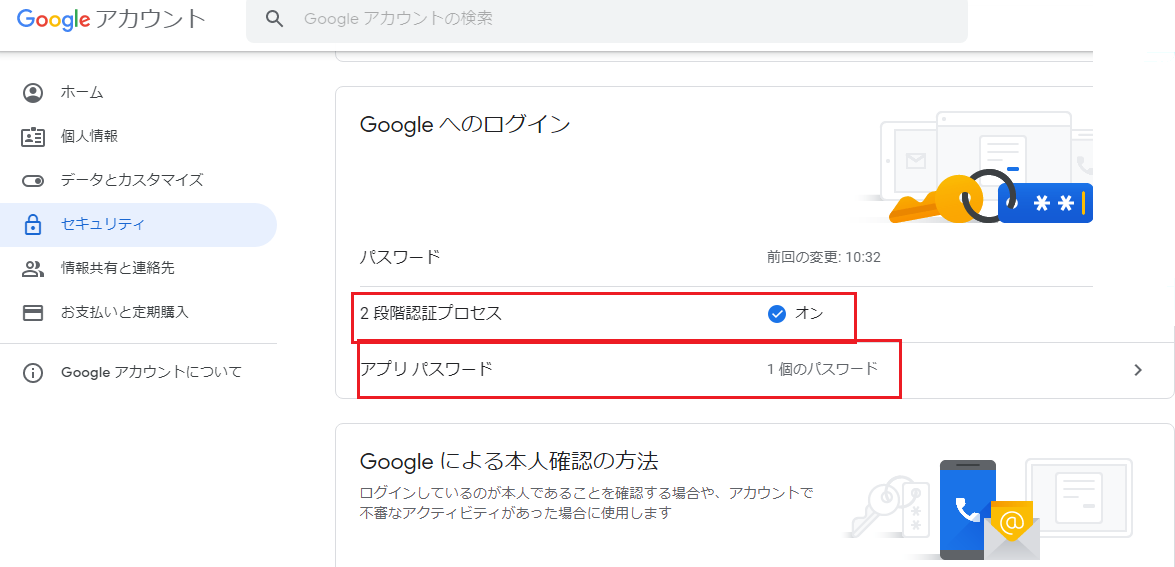
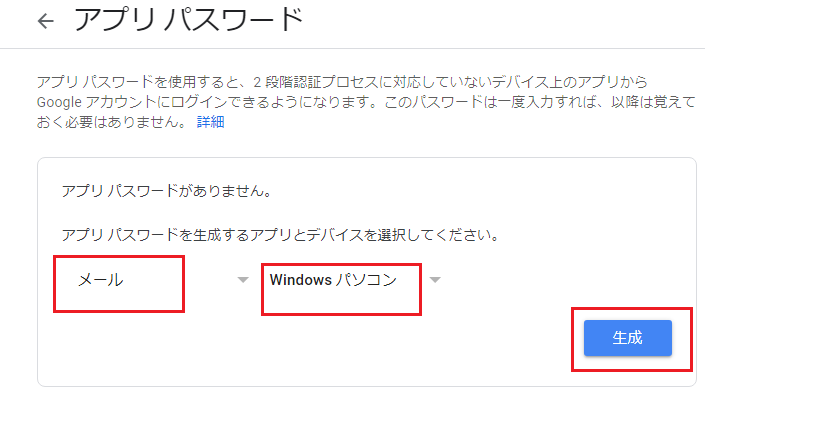
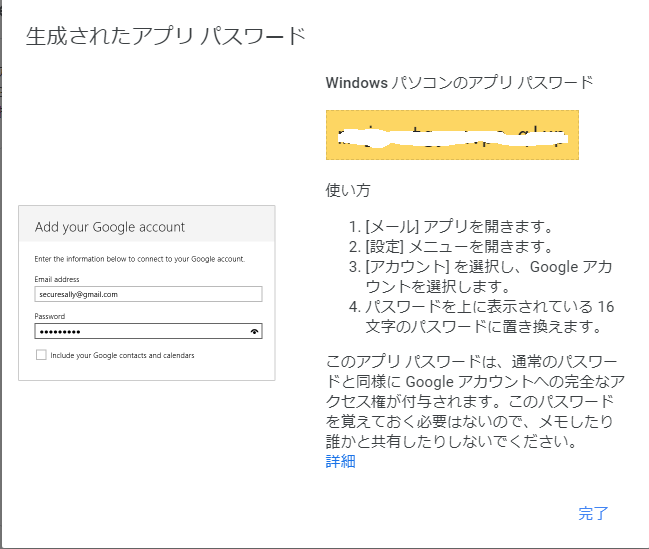
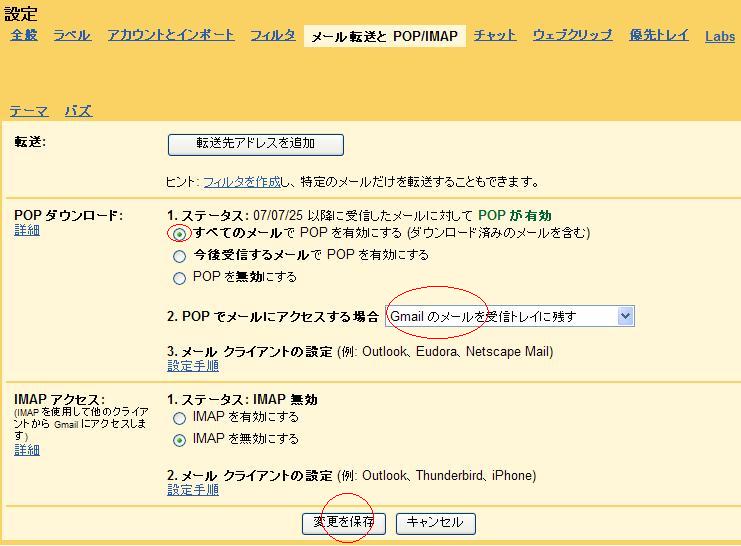
メール送信サンプル
' sendmail.vbs --------------------
Set bobj = CreateObject("basp21pro")
bobj.debugclear 1
bobj.Server="smtp.gmail.com:465" ' ポート465 を指定します
mailto = "xxxxyyy@xxxx.ggg"
mailfrom = "yyy@yyyyy.ccc"
bobj.mailfrom = mailfrom & ",user:pass" ' SMTP AUTH を使います
subj = "test"
body = "これはテストメールです。"
files = ""
rc = bobj.SendMail(mailto, subj, body, files)
bobj.debug "Done. " & rc
WScript.Quit
メール受信サンプル
' rcvmail.vbs --------------------
Set bobj = CreateObject("basp21pro")
bobj.debugclear 1
bobj.PopServer="pop.gmail.com:995" ' ポート995を指定します
ar = bobj.RcvMail("user","pass","list")
if isarray(ar) then
num = 1
for each line in ar
bobj.debug num & " " & line
num = num+1
next
end if
bobj.debug "Done. " & rc
WScript.Quit
Response.ContentType = "application/octet-stream;name=" & fname Response.AddHeader "Accept-Ranges", "bytes" Response.AddHeader "Content-Disposition","attachment;filename=" & fname Response.AddHeader "Content-Length",flenこれは、IIS7.5の仕様のようです。
Response.ContentType = "application/octet-stream;name=" & fname Response.AddHeader "Accept-Ranges", "bytes" Response.AddHeader "Content-Disposition","attachment;filename=" & fname '''Response.AddHeader "Content-Length",flen ' IIS7.5 コメントアウト
'''' sample.vbs
Dim bobj,mailto,mailfrom
Dim sbj,body,file,rc
Set bobj = CreateObject("basp21pro")
' サーバー名,TLSの有効化,ポート番号587
bobj.Server = "TLS smtp.mail.apac.microsoftonline.com:587"
' メール送信先アドレス
mailto = "xxxxx@xxxxxxxx.xxx"
' メール送信元アドレス、Exchange Onlineのユーザー名およびパスワード
bobj.mailfrom = "xxxxxxx@xxxxx.xxx" & ",username:password"
sbj = "件名"
body = "試験です" & vbCrLf
file = ""
rc = bobj.SendMail(mailto,sbj,body,file)
また、basp21p.iniファイルに以下の設定が必要です。
mailoption2=EHLO2=yes
# ServerプロパティやMailFromプロパティの代わりに
# 以下のように指定可能です
server=TLS smtp.mail.apac.microsoftonline.com:587
maifrom=xxxxxxx@xxxxx.xxx,username:password
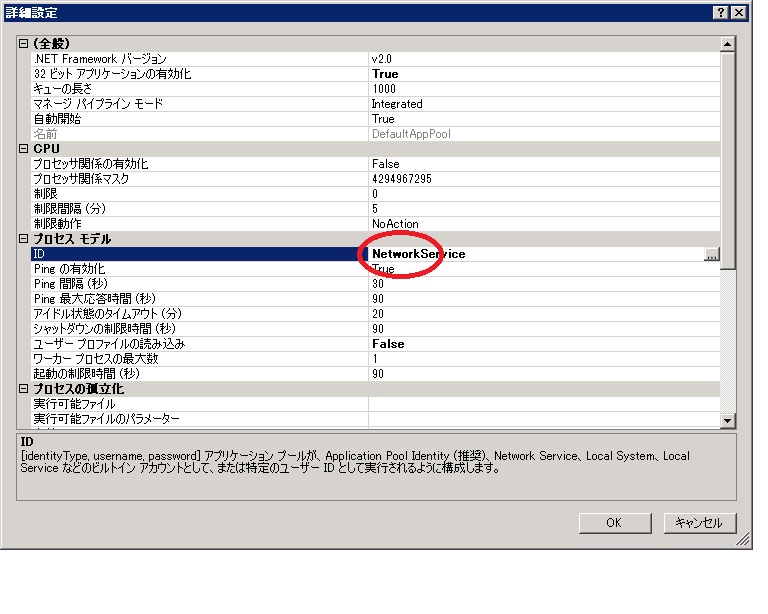
IIS7.5 アプリケーション プール ID を構成するには [アプリケーション プール] 機能ページで、 一覧からアプリケーション プールを選択します。 [操作] ウィンドウで、[詳細設定] をクリックします。 [プロセス モデル] で、[ID] ボックスを探し、 […] (プロパティ ボタン) をクリックして、 [アプリケーション プール ID] ダイアログ ボックスを開きます。 ID オプションを選択します。 定義済みのセキュリティ アカウントを使用する [ビルトイン アカウント] を選択し、 一覧からNetworkServiceアカウントを選択します。
maxAllowedContentLengthを1.5Gに変更する例: cd C:\Windows\System32\inetsrv ... フォルダ移動 appcmd set config -section:requestFiltering -requestLimits.maxAllowedContentLength:1610612736 -commitpath:apphost 構成変更を構成コミット パス "MACHINE/WEBROOT/APPHOST" の "MACHINE/WEBROOT/APPHOST" のセクション "system.webServer/security/requestFiltering" に適用しました
現状の受信ウィンドウ自動チューニングの表示例: netsh interface tcp show global または netsh i t sh g アクティブ状態を照会しています... TCP グローバル パラメーター ---------------------------------------------- Receive-Side Scaling 状態 : enabled Chimney オフロード状態 : automatic NetDMA 状態 : enabled Direct Cache Acess (DCA) : disabled 受信ウィンドウ自動チューニング レベル : highlyrestricted アドオン輻輳制御プロバイダー : none ECN 機能 : disabled RFC 1323 タイムスタンプ : disabled normalに変更例: netsh interface tcp set global autotuninglevel=normal または netsh i t s g a=n OK disabledに変更例: netsh interface tcp set global autotuninglevel=disabled または netsh i t s g a=d OK
IIS で Classic ASP Web サイトを構築する http://technet.microsoft.com/ja-jp/library/hh831387.aspx
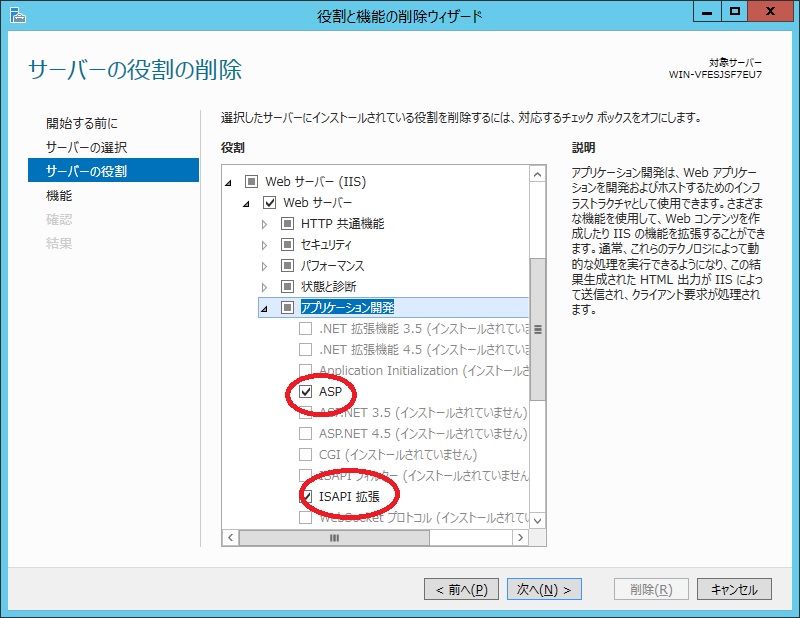
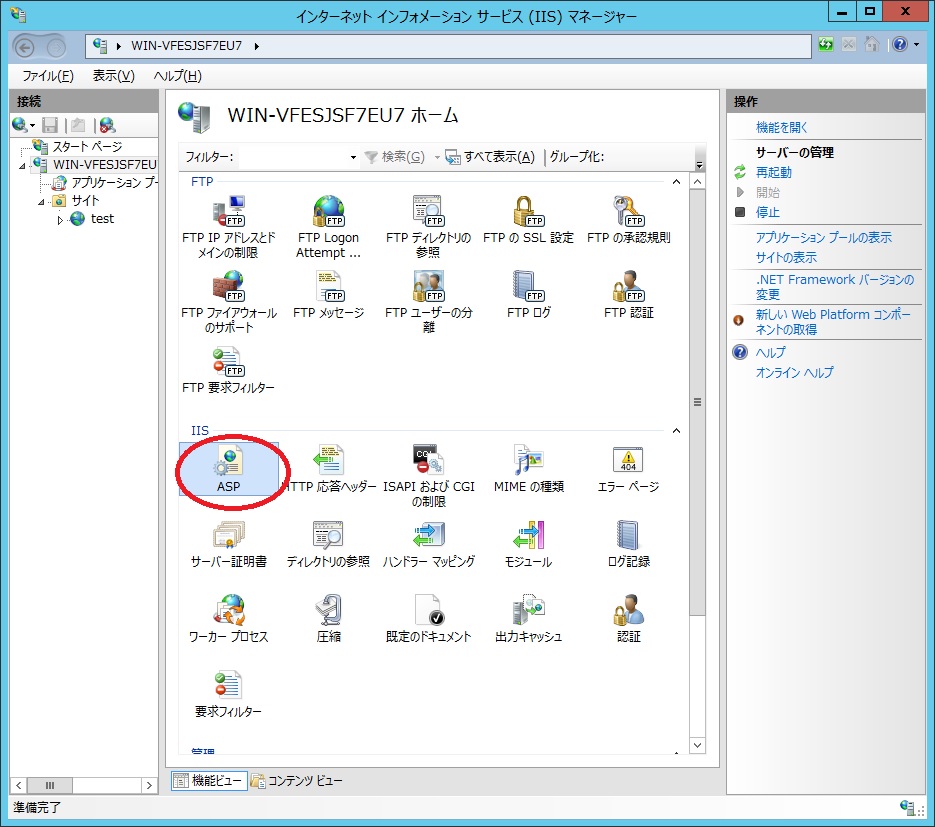
[ASP]アイコンをダブルクリックします。
[最大要求エンティティボディ制限]の値を変更します。
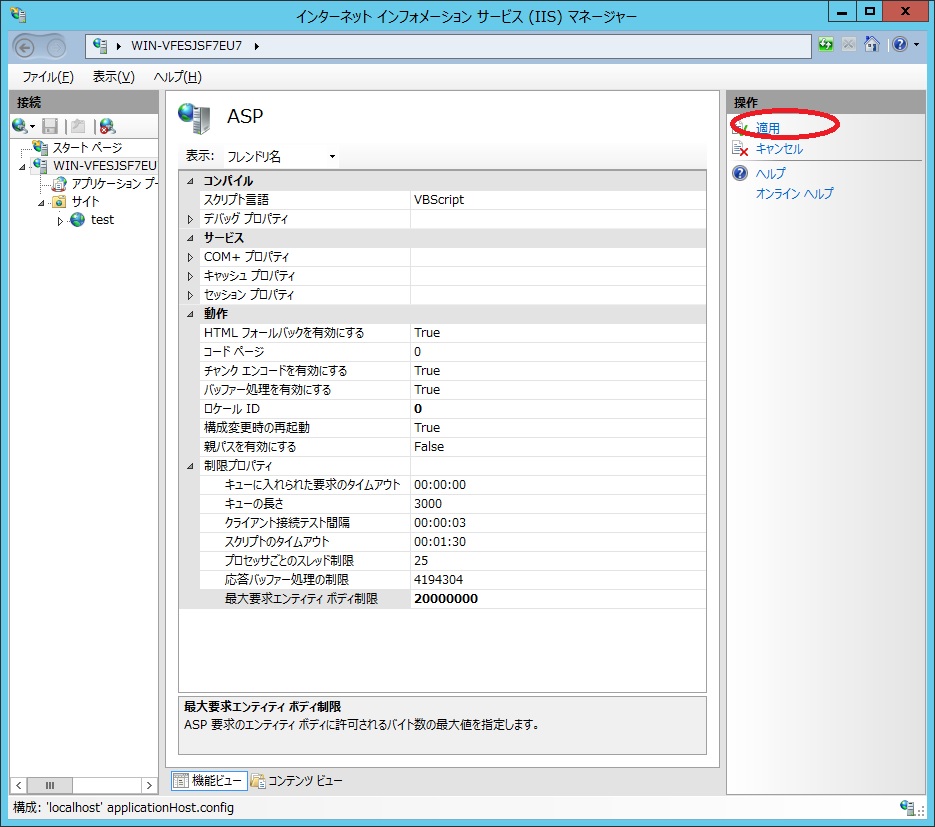
右上の[適用]をクリックします。
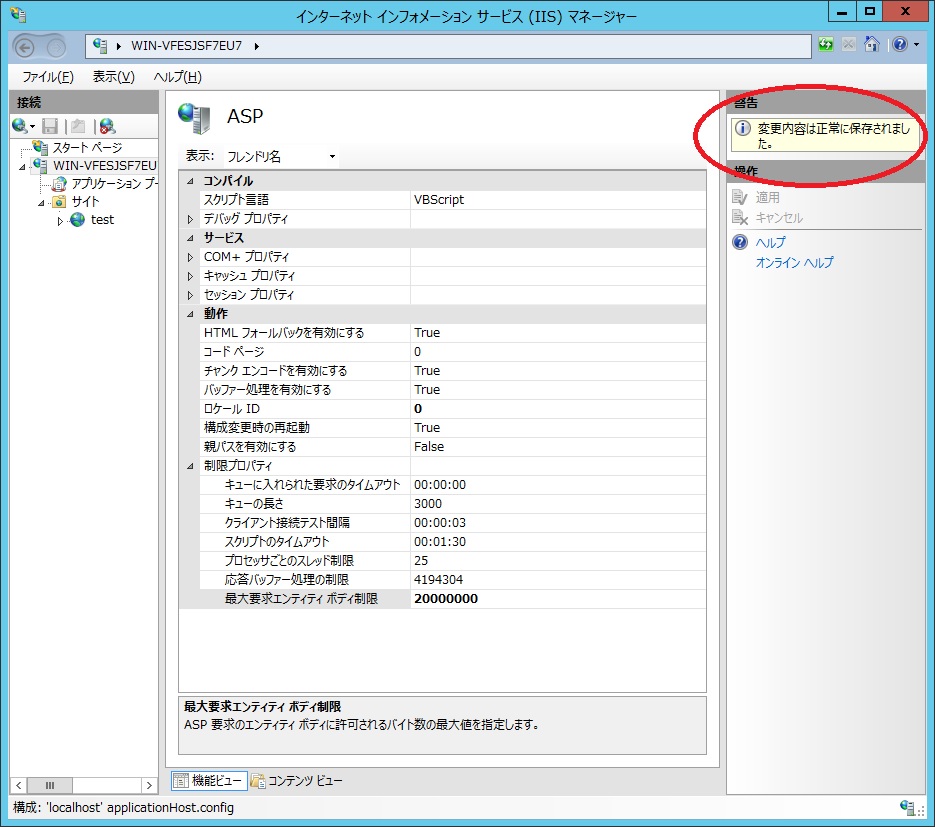
右上のメッセージを確認して変更終了です。
IISマネージャでアプリケーションプールを選択して[詳細設定]をクリックします。
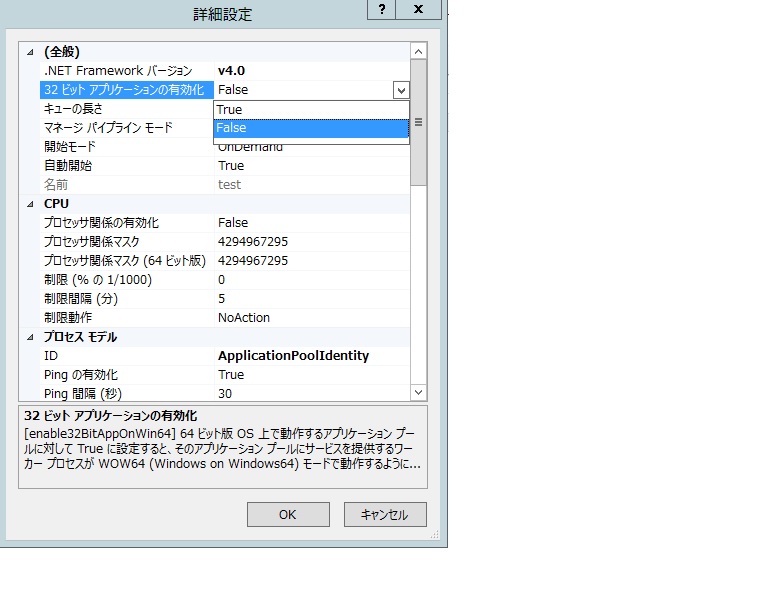
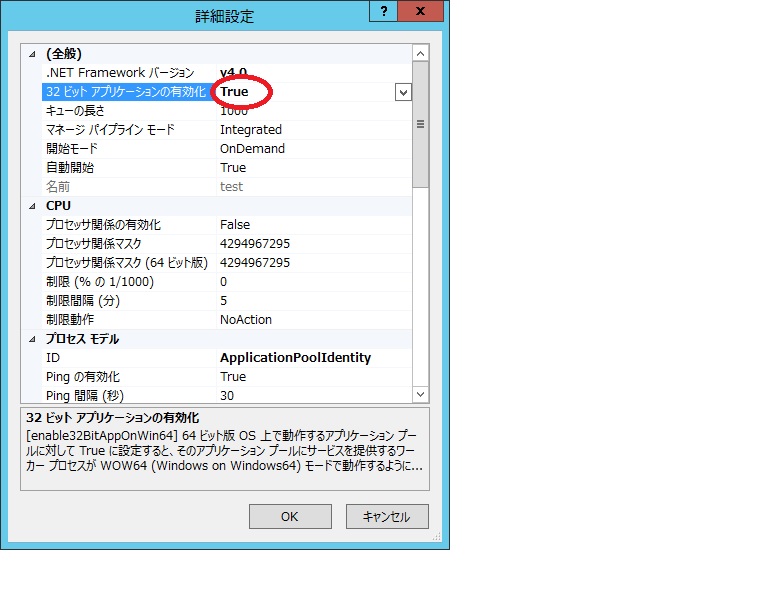
[32ビットアプリケーションの有効化]の値を False から True に変更します。
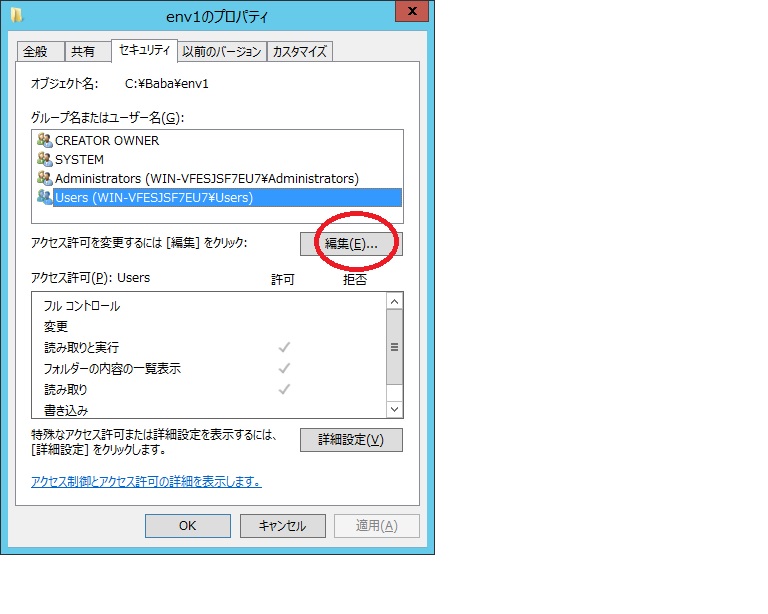
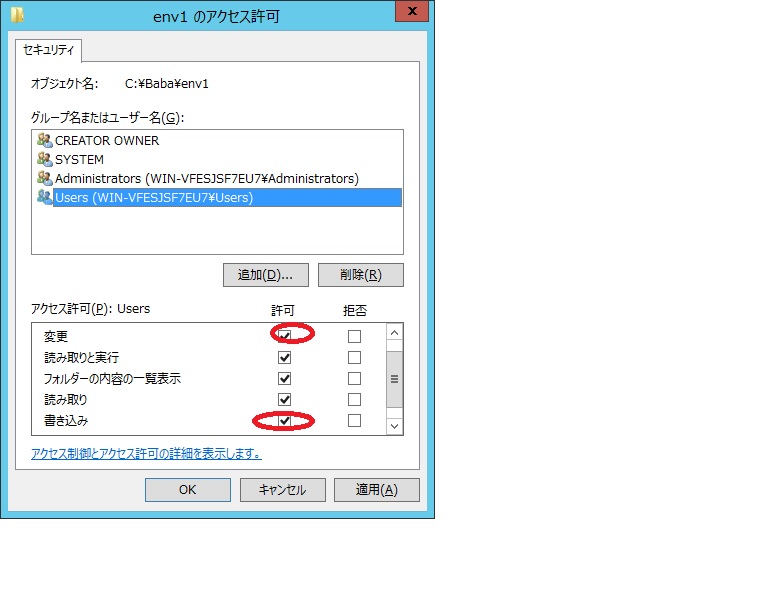
エクスプローラでフォルダの[プロパティ]-[セキュリティ]で Users アカウントを選択します。 [編集]をクリックします。
[書き込み]と[変更]を許可のチェックを入れます。
<%
Set bobj = Server.CreateObject("basp21pro")
bobj.env="needssl"
bobj.env="+logfile=c:\b21\log2.txt"
mailto = "○○○@○○○"
subject = "こんにちは!"
mailbody = "Gmail テストです。" & vbscrlf & "以上。"
files=""
bobj.Server = "TLS smtp.gmail.com:587"
bobj.MailFrom = "○○○@gmail.com,○○○@gmail.com:○○○"
rc = bobj.SendMail(mailto,subject, mailbody,files)
msg=bobj.LastMsg
%>
<html><body>
rc=
<%= rc %>
<br>
<%= msg %>
</body></html>
☆ basp21p.ini
[global]
license=xxxxx
allow=all
[env1]
allow=all
[needssl]
allow=all
logonuser=user1:pass1
logonuserパラメータで管理者アカウントを指定しないと、以下のようなエラーとなります。
rc= -45
2013/06/30 11:54:06.468 3768-702433840 env1(64bit) SendMail ERROR:-45 [IUSR]smtp error handshake failes:-2146893042
Function htmlFilter(html)
Dim htmlfile
Set htmlfile = CreateObject("htmlfile")
htmlfile.Write(html)
htmlFilter = htmlfile.body.innerText
End Function
body.innerTextメソッドは、<OL><LI><UL><HR> タグを無視します。
<OL><LI><UL><HR> タグを考慮したサンプルは、こちら。
Function htmlFilter(html)
Dim in_pre,buf,line
html = Replace(html,vbcrlf,chr(1))
html = Replace(html,vbcr,chr(1))
html = Replace(html,vblf,chr(1))
html = regexrep(html,"<head.+?</head.*?>","")
html = regexrep(html,"<script.+?</script.*?>","")
' <pre>内以外では空白を除去
in_pre = 0
buf = ""
For Each line in split(html,chr(1))
If regexmatch(line,"<pre[^>]*>") Then
in_pre = 1
ElseIf regexmatch(line,"</pre[^>]*>") Then
in_pre = 0
End If
If in_pre = 1 Then
line = line & chr(1)
Else
line = regexrep(line," +"," ")
line = line & chr(2)
End If
buf = buf & line
Next
html = buf
html = Replace(html,chr(2),"")
'# <ol>内の<li>の処理 連番 1. 2. 3. ... を追加
Dim pos,leng,li,ol,op,i,litag,sv1,sv2,regret
sv1 = 0: sv2 = 0
Do
regret = regexsubmatch(Mid(html,sv1+1),"<ol[^>]*>(.*?)</ol[^>]*>")
ol = regret(0)
If Len(ol) = 0 Then exit Do
sv1 = regret(1) + sv1
op = sv1
i = 0
Do
regret = regexsubmatch(Mid(ol,sv2+1),"(<li[^>]*>)")
litag = regret(0)
If Len(litag) = 0 Then exit Do
sv2 = regret(1) + sv2
i = i + 1
Push pos, sv2 + op - 1
Push leng, regret(2) - regret(1)
Push li, i ' 連番
Loop
Loop
Push pos, Len(html)+1
buf = html
html = Mid(buf, 1, pos(0)-1)
If IsArray(leng) Then
For i = 0 to UBound(leng)
html = html & vbtab & li(i) & ". " & Mid(buf, pos(i) + leng(i) , pos(i + 1) - (pos(i) + leng(i)))
If i <= UBound(leng) - 1 Then
html = html & chr(1)
End If
Next
End If
'# <ul>内の<li>の処理 ・ ・ ... を追加
pos = null
leng = null
sv1 = 0: sv2 = 0
Do
regret = regexsubmatch(Mid(html,sv1+1),"<ul[^>]*>(.*?)</ul[^>]*>")
ol = regret(0)
If Len(ol) = 0 Then exit Do
sv1 = regret(1) + sv1
op = sv1
Do
regret = regexsubmatch(Mid(ol,sv2+1),"(<li[^>]*>)")
litag = regret(0)
If Len(litag) = 0 Then exit Do
sv2 = regret(1) + sv2
i = i + 1
Push pos, sv2 + op - 1
Push leng, regret(2) - regret(1)
Loop
Loop
Push pos, Len(html) + 1
buf = html
html = Mid(buf, 1, pos(0)-1)
If IsArray(leng) Then
For i = 0 to UBound(leng)
html = html & vbtab & "・ " & Mid(buf, pos(i) + leng(i) , pos(i + 1) - (pos(i) + leng(i)))
If i <= UBound(leng) - 1 Then
html = html & chr(1)
End If
Next
End If
' 最低限の整形をする
html = regexrep(html,"<h[1-9]>",chr(1))
html = regexrep(html,"</h[1-9]>",chr(1))
html = regexrep(html,"<p[^>]*>",chr(1))
html = regexrep(html,"<br[^>]*>",chr(1))
html = regexrep(html,"<div[^>]*>",chr(1))
html = regexrep(html,"</div[^>]*>",chr(1))
html = regexrep(html,"<center[^>]*>",chr(1))
html = regexrep(html,"</center[^>]*>",chr(1))
html = regexrep(html,"<ol[^>]*>",chr(1))
html = regexrep(html,"</ol[^>]*>",chr(1))
html = regexrep(html,"<ul[^>]*>",chr(1))
html = regexrep(html,"</ul[^>]*>",chr(1))
html = regexrep(html,"<hr[^>]*>",chr(1) & "----------------------------------------------------------------------------" & chr(1))
html = regexrep(html,"<table[^>]*>",chr(1))
html = regexrep(html,"</table[^>]*>",chr(1))
html = regexrep(html,"<tr[^>]*>",chr(1))
html = regexrep(html,"<th[^>]*>",vbtab)
html = regexrep(html,"<td[^>]*>",vbtab)
html = regexrep(html,"<[^>]+>","") ' すべてのタグを除去
html = regexrep(html," "," ")
html = Replace(html,"&","&")
html = Replace(html,""","""")
html = Replace(html,"<","<")
html = Replace(html,">",">")
html = regexrep(html,chr(1) & chr(1) & "+",chr(1)) ' 改行をまとめる
htmlFilter = Replace(html,chr(1),vbcrlf)
End Function
Function regexrep(src,pattern,rep)
Dim regEx
Set regEx = New RegExp
regEx.IgnoreCase = True
regEx.Global = True
regEx.Pattern = pattern
regexrep = regEx.replace(src,rep)
End Function
Function regexmatch(src,pattern)
Dim regEx
Set regEx = New RegExp
regEx.IgnoreCase = True
regEx.Pattern = pattern
regexmatch = regEx.Test(src)
End Function
Function regexsubmatch(src,pattern)
Dim regEx,objmatches,objSub,lastmatch,regret
regret= Array("",0,0)
regexsubmatch = regret
Set regEx = New RegExp
regEx.IgnoreCase = True
regEx.Pattern = pattern
Set objmatches = regEx.Execute(src)
If objmatches.Count = 0 Then Exit Function
Set objSub = objmatches.Item(0).SubMatches
regret(0) = objSub.Item(0)
regret(1) = InStr(src,regret(0))
regret(2) = regret(1) + Len(regret(0))
regexsubmatch = regret
End Function
Sub Push(arr,elm)
Dim i,tmp : i = 0
If IsArray(arr) Then
For Each tmp In arr
i = 1
Exit For
Next
If i = 1 Then
Redim Preserve arr(Ubound(arr)+1)
Else
Redim arr(0)
End If
Else
arr = Array(0)
End If
If IsObject(elm) Then
Set arr(Ubound(arr)) = elm
Else
arr(Ubound(arr)) = elm
End If
End Sub
basp21p.ini ファイル mailoption2=savenew=onlysavenew=onlyオプションは、basp21p.dll バージョン 1,0,1401,20以降で有効です。
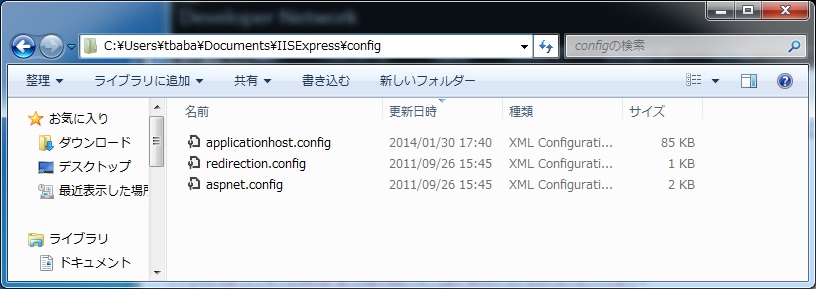
(200行目くらい)
<system.webServer>
<serverRuntime />
<asp scriptErrorSentToBrowser="true" appAllowDebugging="true">
<cache diskTemplateCacheDirectory="%TEMP%\iisexpress\ASP Compiled Templates" />
<limits maxRequestEntityAllowed="20480000" />
</asp>
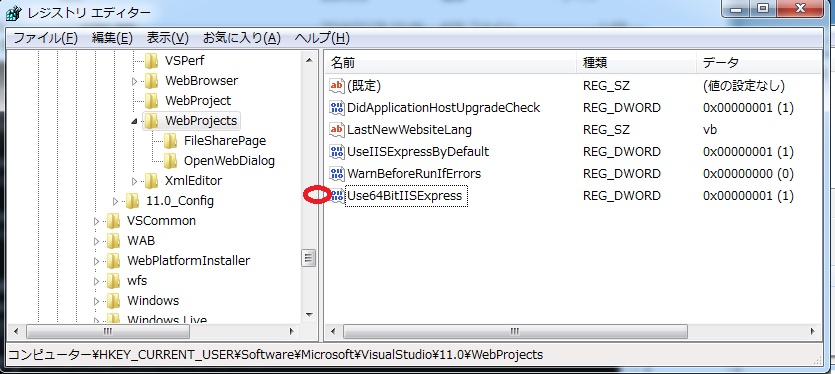
Visual Studio 2012 ------------------ [HKEY_CURRENT_USER\Software\Microsoft\VisualStudio\11.0\WebProjects] "Use64BitIISExpress"=dword:00000001 Visual Studio 2013 ------------------ [HKEY_CURRENT_USER\Software\Microsoft\VisualStudio\12.0\WebProjects] "Use64BitIISExpress"=dword:00000001注意点として、Visual Studio からの64ビット版IIS Express起動は 正式サポートではないようです。
Microsoft Access database engine 2010(Japanese) 64ビット版が必要です。 http://www.microsoft.com/ja-jp/download/details.aspx?id=13255 (Microsoft Access データベース エンジン 2010 再頒布可能コンポーネント) AccessDatabaseEngine_X64.exe をダウンロードしてインストールします。 サンプル ''' Excelシートを読込む Dim excel_file,sheetname,Driver,objADO,sqlstr,objRS,line excel_file = "c:\wk\test.xls" sheetname = "Sheet1" Driver = "Driver=Microsoft Excel Driver (*.xls, *.xlsx, *.xlsm, *.xlsb); DBQ=%s;" Set objADO = Server.CreateObject("ADODB.Connection") Driver = Replace(Driver,"%s",excel_file) objADO.Open Driver sqlstr = "select * from [" & sheetname & "$]" Set objRS = objADO.Execute(sqlstr) Do Until objRS.Eof = True line = objRS.Fields(0).value & _ objRS.Fields(1).value & _ objRS.Fields(2).value objRS.MoveNext Loop objRS.Close objADO.Close Set objADO = NothingExcelファイルをアップロードして、テキストファイル(タブ区切り)に変換してダウンロードするサンプルです。
----- excelconv.html ----------------
<html><body>
<form action=excelconv.asp method=post enctype=multipart/form-data target=_blank>
<input type=file name=file001>
シート名:<input type=text name=sheetname value='Sheet1'><br>
カラム番号:<input type=text name=colspos value='1,2,3'><br>
<input type=submit name=save value=CSV変換>
</form>
----- excelconv.asp ----------------
<%@ Language="VBScript" codepage=65001 %>
<% Option Explicit %>
<%
Dim bobj,excelfile,a,b,fpath,msg,rc
Dim objFileSys,objADO,Driver,objRS,objWriteStream,orgname
Dim sheetname,colpos,sqlstr,txtfile,line,i,ext,base
Const WORK_FOLDER = "c:\wk\data\"
msg=""
Set objFileSys = Server.CreateObject("Scripting.FileSystemObject")
Set bobj = Server.CreateObject("basp21pro")
Driver = "Driver=Microsoft Excel Driver (*.xls, *.xlsx, *.xlsm, *.xlsb);DBQ=%s;"
a = Request.TotalBytes
b = Request.BinaryRead(a)
excelfile = bobj.FormFileName(b,"file001",5)
orgname = excelfile
msg = cleanup_folder(WORK_FOLDER,".xls")
fpath = WORK_FOLDER & excelfile
If objFileSys.FileExists(fpath) Then
i = Instrrev(excelfile,".")
base=Mid(excelfile,1,i-1)
ext=Mid(excelfile,i)
For i = 1 to 9999 ' ADO.Open がファイルをロックするため常に新しい名前で保存
excelfile=base & "(" & i & ")" & ext
fpath = WORK_FOLDER & excelfile
If Not objFileSys.FileExists(fpath) Then Exit For
Next
End If
sheetname = bobj.Form(b,"sheetname",5)
colpos = bobj.Form(b,"colspos")
txtfile = WORK_FOLDER & orgname & ".txt"
rc = bobj.FormSaveAs(b,"file001",fpath)
If rc > 0 Then
colpos = Split(colpos,",")
Set objADO = Server.CreateObject("ADODB.Connection")
Driver=Replace(Driver,"%s",fpath)
On Error Resume Next
objADO.Open Driver
If Err<>0 Then
msg = Err.Number & " : " & Err.Description & " : " & Driver
Else
sqlstr = "select * from [" & sheetname & "$]"
Set objRS = objADO.Execute(sqlstr)
If Err<>0 Then
msg = Err.Number & " : " & Err.Description & " : " & sqlstr
End If
End If
If Len(msg) = 0 Then
Set objWriteStream = objFileSys.OpenTextFile(txtfile, 2, True)
Do Until objRS.Eof = True
line=""
For i = 0 to UBound(colpos)
line = line & objRS.Fields(colpos(i)-1).value & vbTab
If Err<>0 Then
msg = Err.Number & " : " & Err.Description
objWriteStream.WriteLine msg
End If
Next
objWriteStream.WriteLine Mid(line,1,Len(line)-1)
objRS.MoveNext
Loop
objRS.Close
objADO.Close
Set objADO = Nothing
objWriteStream.Close
Set objWriteStream = Nothing
b = bobj.BinaryRead(txtfile)
Response.Expires = -1
Response.ContentType = "application/octet-stream"
Response.AddHeader "Content-Disposition", "attachment; filename=" & orgname & ".txt"
Response.AddHeader "Content-Length",UBound(b)+1
Response.Flush()
Response.BinaryWrite(b)
Response.End()
msg=""
End If
Else
msg = bobj.LastMsg
End If
Set objFileSys = Nothing
Set bobj = Nothing
If Len(msg) > 0 Then
Response.Write "<html><head>"
Response.Write "<META http-equiv=""Content-Type"" content=""text/html; charset=UTF-8"">"
Response.Write "<title>error</title>"
Response.Write "</head><body>"
Response.Write msg
Response.Write "</body></html>"
End If
' 5分以上前のファイルを削除
Function cleanup_folder(subdir,ext)
Dim subf,fname,fdate
On Error Resume Next
Set subf = objFileSys.GetFolder(subdir)
For Each fname In subf.Files
If Instr(fname.name,ext) > 0 Then
fdate = fname.DateLastModified
If DateDiff("n", fdate, now()) >= 5 then
objFileSys.DeleteFile fname,True
If Err <> 0 Then
cleanup_folder = Err.Number & " : " & Err.Description & _
" : " & fname.name & " " & DateDiff("n", fdate, now())
Exit Function
End If
End If
End if
Next
cleanup_folder=""
End Function
%>
注意:ASP(64ビット)+ADOで、Excelシートを開いた場合、
IISワーカープロセスが そのExcel ファイルをロックします。| Windows OS | サポート終了日 |
|---|---|
| Windows 11 Home / Pro 24H2 | 2026/10/13 |
| Windows 11 Home / Pro 25H2 | 2027/10/13 |
| Windows 11 Enterprise / Education 23H2 | 2026/11/10 |
| Windows 11 Enterprise / Education 24H2 | 2027/10/12 |
| Windows 11 Enterprise / Education 25H2 | 2028/10/10 |
| Windows Server 2016 | 2027/1/11 |
| Windows Server 2019 | 2029/1/9 |
| Windows Server 2022 | 2031/10/14 |
| Windows Server 2025 | 2034/10/14 |
fpath="c:\wk\Book1.xls"
Driver = "Driver=Microsoft Excel Driver (*.xls, *.xlsx, *.xlsm, *.xlsb); DBQ=%s;"
Set objADO = Server.CreateObject("ADODB.Connection")
Driver=Replace(Driver,"%s",fpath)
objADO.Open Driver
objADO.Close
| コンポーネント | バージョン | 対象メソッド |
|---|---|---|
| BASP21 Pro メイン(basp21p.dll) | 1,0,1410,15以前 | SSLモードのUpLoad/DownLoad/SendMail/RcvMail/FlushMail |
| FTPオブジェクト(bftp.dll) | 1,0,912,18以前 | SSLモードのConnect |
| ソケットオブジェクト(bsocket.dll) | 1,0,1410,15以前 | SSLConnect |
| BFup Pro ActiveX(bfupp.dll) | 1,0,1410,16以前 | SSLモードのUpLoad/DownLoad |
SSL 3.0に関する脆弱性とは: [説明] 2014/10/14に公開された、 POODLE(Padding Oracle On Downgraded Legacy Encryption)と名づけられた 当脆弱性を利用した攻撃では、SSL 3.0を有効にしているサーバとの通信において、 パスワード等の重要情報やCookie情報が第三者に漏えいする可能性があります。 [対象] SSL 3.0による通信が有効なサーバ、クライアント。 httpsアクセスだけでなく、メール送受信、FTPアクセスも含まれます。 [対応方法] クライアント、サーバーでSSL 3.0 プロトコルを無効にする。 参考サイト: マイクロソフト セキュリティ アドバイザリ 3009008 SSL 3.0 の脆弱性により、情報漏えいが起こる(公開日:2014/10/15)
bconv21.vbs [入力フォルダ名][,出力フォルダ名]
パラメータ
入力フォルダ名: 変換したいファイルの場所。
出力フォルダ名: 変換後のファイル作成場所。
変換されたファイルは、名前に "pro_" を追加して作成。
省略時は入力フォルダと同じ。
パラメータなしの時はカレントフォルダのファイルを処理。
使用方法
コマンドラインから
cscript c:\b21\bconv21.vbs c:\indir
または、対象フォルダに bconv21.vbs をコピーして ダブルクリック
機能説明
BASP21フリー版のソースコードを
BASP21 Pro対応のソースコードに変換します。
変更箇所をログに記録します。
変換項目は、以下のとおりです。
1.PROG-ID
Set bobj = Server.createobject("basp21")
Set bobj = Server.createobject("basp21pro")
Set bsocket = Server.CreateObject("basp21.socket")
Set bsocket = Server.CreateObject("basp21pro.socket")
Set bftp = Server.CreateObject("basp21.ftp")
Set bftp = Server.CreateObject("basp21pro.ftp")
2.SendMailメソッド
rc = bobj.SendMail(svname,mailto,mailfrom,subj,body,files)
bobj.Server = svname
bobj.Mailfrom = mailfrom
rc = bobj.SendMail(mailto,subj,body,files)
3.RcvMailメソッド
output = bobj.RcvMail(svname,user,pass,command,dirname)
bobj.PopServer = svname
output = bobj.RcvMail(user,pass,command,dirname)
4.Executeメソッド
rc = bobj.Execute(cmd,mode,stdout)
stdout = bobj.Execute(cmd,mode)
5.SendMailExメソッド
rc = bobj.SendMailEx(logname,svname,mailto,mailfrom,subj,body,files)
bobj.env = "+logfile=" & logfile
bobj.Server = svname
bobj.Mailfrom = mailfrom
rc = bobj.SendMail(mailto,subj,body,files)
このバージョン以前のFTPオブジェクトを使うと 以下のFTPサーバーで、ftpsによるファイル転送が失敗します(オプションパラメータなしの場合のみ)。
| FTPサーバー | オプションパラメータ | エラーメッセージ |
|---|---|---|
| vsftpd(v2.1.0以降) | require_ssl_reuse=NO | 522 SSL connection failed; session reuse required |
| proftpd(v1.3.3以降) | TLSOptions NoSessionReuseRequired | 425 Unable to build data connection: Operation not permitted |
これは、セキュリティ対策のため、FTPクライアント側が
SSLデータ接続セッションを開くときに
SSLコントロール接続セッションを再利用しないと
FTPサーバーがエラーを返すように修正されたのが原因です。
Microsoft FTP Service は、SSLセッション再利用のチェックをしませんのでエラーとはなりません。
SSLセッションを再利用しない FTPクライアント(例:バージョン1,0,1501,26 以前のFTPオブジェクト)では
回避策として、FTPサーバー側のオプションパラメータ(例:require_ssl_reuse=NO)を設定します。
参考:
SSL 3.0プロトコル脆弱性(POODLE)の影響はありますか

【重要】SSL 3.0 の脆弱性への対策(office365)
http://community.office365.com/ja-jp/b/office_365_buzz/archive/2014/10/30/protecting-you-against-the-ssl-3-0-vulnerability.aspx
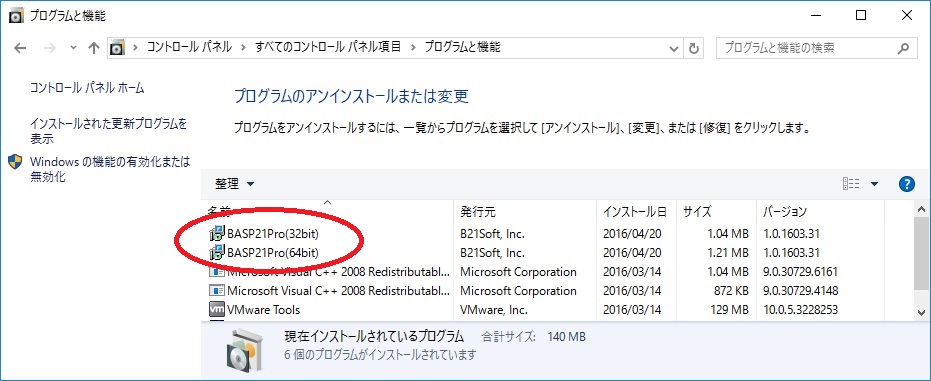
re-regist.vbs をダブルクリック。
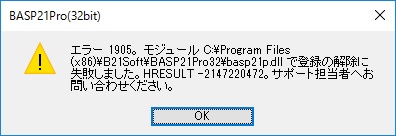
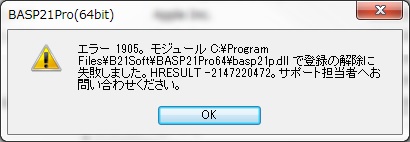
basp21p.ini ファイル
ipv6=1
スクリプトでも指定可能です。
bobj.Env = "+ipv6=1"IPv6接続指定(ipv6=1またはipv6=2)の場合、ホスト名をgetaddrinfo()でIPv6アドレスを取得します。
bobj.Server = "[2001:0DB8::7142]:995"
url = "http://[2001:0DB8::7142]/test/index.html"
basp21p.ini ファイル
zip=sendmail
スクリプトでも指定可能です。
bobj.Env = "+zip=sendmail"添付ファイルは、複数指定可能です。1つのZIPファイルとして送信します。
bobj.Env = "+zip=sendmail" ' ZIP処理宣言
bobj.Env = "+zippass=abc123"   ' パスワード abc123
files = "c:\dir1,c:\dir2\aa.doc"   ' dir1フォルダ以下とaa.doc を ZIP
rc=bobj.SendMail(mailto,subj,body,files)
basp21p.ini ファイル
zip=readmail
スクリプトでも指定可能です。
bobj.Env = "+zip=readmail"添付ファイルは、複数処理可能です。
bobj.Env = "+zip=readmail"
bobj.Env = "+zippass=abc123"   ' パスワード abc123
file = "c:\mailbox\mailfile1.txt"   ' RcvMailメソッドで受信したメールファイル
ar=bobj.ReadMail(file,"subject:to:from:date:","c:\mailbox")

' ReadDirメソッドでもZIPファイルを展開できます。
bobj.Env = "+zip=readdir"
bobj.Env = "+zipdir=c:\mailbox\zip" ' 展開先フォルダ
file = "c:\mailbox\test.zip"   ' ZIPファイル
ar = bobj.Readdir(file)   ' ファイルリストを配列で返します
basp21p.ini ファイル
zip=upload,formsaveas
スクリプトでも指定可能です。
bobj.Env = "+zip=upload,formsaveas"ファイルは、フォルダ指定も可能です。
bobj.Env = "+zip=upload"
file = "c:\dir1"   ' フォルダ指定
rc=bobj.UpLoad(url,file)

' FormSaveAsメソッドでZIPファイルを展開できます。
bobj.Env = "+zip=formsaveas"
bobj.Env = "+zipdir=c:\upload\zip" ' 展開先フォルダ
rc = bobj.FromSaveAs(b,"xfile001",fpath)   ' ZIP展開
bftp.Command("zip=putfile,getfile")
bftp.Command("zipdir=ZIP処理フォルダ")
bftp.Command("zippass=パスワード")
bftp.Command("zipopt=ZIPオプション")
bftp.Command("zipfilter=絞込みファイル名")
ファイルは、フォルダ指定も可能です。
''' サンプル
Set bftp = WScript.CreateObject("basp21pro.FTP")
bftp.OpenLog "c:\wk\ftplog.txt"
rc = bftp.Connect("ftp-server", "user", "password")
rc = bftp.Command("pasv")
rc = bftp.Command("zip=putfile,getfile")
rc = bftp.Command("zipdir=c:\wk\ftp\data.zip")
rc = bftp.Command("zippass=日本です!")
rc = bftp.Command("zipopt=logfile=c:\wk\ziplog1.txt")
rc = bftp.PutFile("c:\wk\data.txt","",1)
rc = bftp.Command("zipopt=logfile=c:\wk\ziplog2.txt") ' zipoptパラメータを上書き
rc = bftp.GetFile("data.zip","c:\wk",1)
WScript.Echo rc
WScript.Quit
実行時にEnvプロパティでも指定できます。
bobj.Env = "+sslver=12"   ' TLS1.2指定

FTPオブジェクトは、以下のように指定します。
rc = bftp.Connect("TLS1.2 ftp.server","user","pass") ' TLS 1.2指定

参考:2018 年 10 月 31 日をもって、Microsoft Office 365 は、TLS 1.0 と 1.1 のサポートを終了します。
Office 365 への TLS 1.2 の実装に対する準備

Microsoft TechNet [IT 管理者向け] TLS 1.2 への移行を推奨しています
https://blogs.technet.microsoft.com/jpsecurity/2017/07/11/tlsmigration/
Windows 2003/XP では、V1,0,1803,20以降のパッケージで以下のインストールエラーとなります。

エラ-1904。モジュール C:\ProgramFiles\B21Soft\BASP21Pro32\basp21p.dllで登録に失敗しました。
HRESULT -2147220473。

これは、
#define _WIN32_WINNT 0x0600 (Windows Vista/2008以上) でビルドしているためです。
サポート対象外のWindows 2003 / XP 環境を除外しています。


V1,0,1803,20以降のbasp21p.dll に対してのregsvr32コマンドでは、以下のエラーとなります。

LoadLibrary("basp21p.dll")に失敗しました - 指定されたプロシージャが見つかりません。
1. Google API Console で[クライアントID]と[クライアントシークレット]の取得
2. Google OAuth APIで[認証コード]を取得
3. Google Token APIで[リフレッシュトークン]を取得
4. basp21p.iniに取得した値を設定
詳細は、こちら。 Gmail SMTP/POP3 OAuth2認証サポート
1. Azure ADアプリケーションを登録[クライアントID]と[クライアントシークレット]の取得
2. 承認エンドポイントから[認証コード]を取得
3. トークンエンドポイントから[リフレッシュトークン]を取得
4. basp21p.iniに取得した値を設定
詳細は、こちら。 Office365 SMTP/POP3 OAuth2認証サポート
参考:Exchange Online の基本認証が非推奨となります(マイクロソフト)
2020年4月6日付で、「Exchange Online の基本認証が非推奨となります」について、
2020年10月13日 から 2021 年後半へ延期するアナウンス(MC208814)がありました。
Private Declare PtrSafe Function SendMail Lib "C:\B21soft\bsmtp64.dll" _
      (szServer As String, szTo As String, szFrom As _
      String, szSubject As String, szBody As String, szFile As String) As String

Private Declare PtrSafe Function RcvMail Lib "C:\B21soft\bsmtp64.dll" _
      (szServer As String, szUser As String, szPass As String, _
      szCommand As String, szDir As String) As Variant

Private Declare PtrSafe Function ReadMail Lib "C:\B21soft\bsmtp64.dll" _
      (szmailfile As String, szpara As String, szDir As String) As Variant


Private Declare PtrSafe Function FlushMail Lib "C:\B21soft\bsmtp64.dll" _
      (szServer As String, szDir As String, szLogfile As String) As Long